






Access Scrapfly Data from MySQL in HeidiSQL

HeidiSQL is an open-source database administration tool that natively supports MariaDB, MySQL, SQL Server, and PostgreSQL. When paired with the CData API Driver for ODBC and SQL Gateway, HediSQL's reach extends to include access to live Scrapfly data. This article demonstrates how to connect to on-premise Scrapfly and query Scrapfly data in HeidiSQL.
Connect to Scrapfly Data
If you have not already done so, provide values for the required connection properties in the data source name (DSN). You can use the built-in Microsoft ODBC Data Source Administrator to configure the DSN. This is also the last step of the driver installation. See the "Getting Started" chapter in the help documentation for a guide to using the Microsoft ODBC Data Source Administrator to create and configure a DSN.
The Scrapfly API uses API Key authentication. The API key is passed as the key query parameter on every request.
Using API Key Authentication
Your Scrapfly API key is required to create a connection. To obtain your API key:
- Log into your Scrapfly account at scrapfly.io.
- Navigate to Dashboard and select API Keys.
- Copy your API key (begins with scp-live- for production or scp-test- for the test environment).
After obtaining your API key, set the following connection properties:
- AuthScheme: Set this to APIKey.
- APIKey: Set this to your Scrapfly API key.
Example connection string:
Profile=C:\profiles\Scrapfly.apip;AuthScheme=APIKey;ProfileSettings='APIKey=your_api_key';
When you configure the DSN, you may also want to set the Max Rows connection property. This will limit the number of rows returned, which is especially helpful for improving performance when designing reports and visualizations.
Configure the SQL Gateway
See the SQL Gateway Overview to set up connectivity to Scrapfly data as a virtual MySQL database. You will configure a MySQL remoting service that listens for MySQL requests from clients. The service can be configured in the SQL Gateway UI.
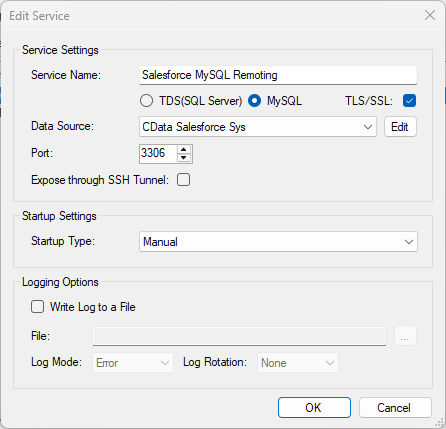
To connect to the SQL Gateway from HeidiSQL, you will need to run the SQL Gateway on a web-facing machine. After configuring the SQL Gateway, make note of the following information:
- The IP address or domain name of the machine hosting the SQL Gateway
- The data source name (likely CData API Sys) of the MySQL service
- The port number of the MySQL service
- The credentials of a SQL Gateway user with access to the service
Configure Remote Access
If your ODBC Driver and the remoting service are installed on-premise (and not accessible from HeidiSQL), you can use the reverse SSH tunneling feature to enable remote access. For detailed instructions, read our Knowledge Base article: SQL Gateway SSH Tunneling Capabilities.
Connect to Scrapfly in HeidiSQL
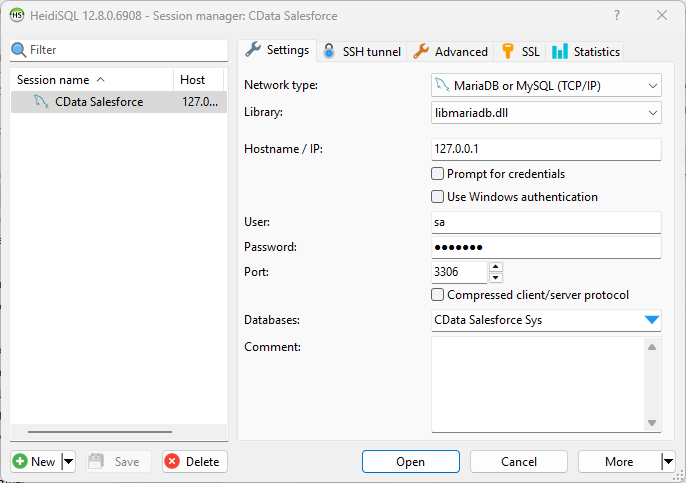
Once you have a MySQL Service configured for the CData API Driver for ODBC, you are ready to connect to the data in HeidiSQL. Start by creating a new connection Session in HeidiSQL, then choose the MySQL library type.
Configure the data set using the values for the MySQL service for Scrapfly you configured in SQL Gateway (be sure to use the DSN for the database name). Validate your connection and click Open.
Query Scrapfly from HeidiSQL
- In the database listing on the left, find your connection to Scrapfly configured earlier.
- In the database listing on the left, expand the appropriate connection and to view individual tables or data objects present within Scrapfly.
- Write custom SQL queries targeting these tables, treating the data source like any SQL Server database, or visually explore each tabular data set by selecting the relevant tables
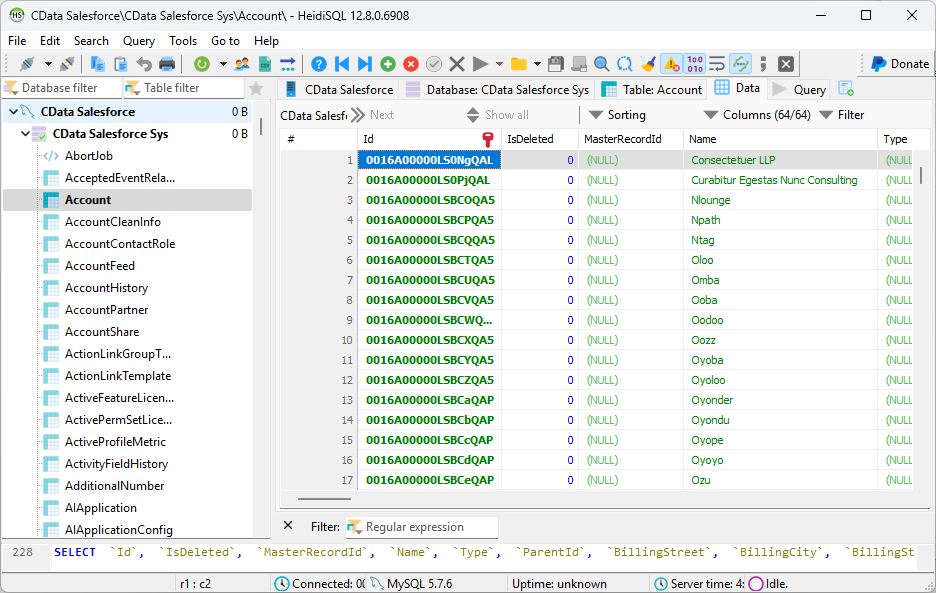
With the CData API Driver for ODBC and SQL Gateway, you are able to easily query data from Scrapfly data in HeidiSQL. If you have any questions, such as needing to access your on-premises data from HeidiSQL, let our Support Team know.