






How to create Short.io federated tables in MySQL

You can use the SQL Gateway to configure a MySQL remoting service and set up federated tables for Short.io data. The service is a daemon process that provides a MySQL interface to the CData ODBC Driver for Short.io: After you have started the service, you can create a server and tables using the FEDERATED Storage Engine in MySQL. You can then work with Short.io data just as you would local MySQL tables.
Connect to Short.io Data
If you have not already done so, provide values for the required connection properties in the data source name (DSN). You can use the built-in Microsoft ODBC Data Source Administrator to configure the DSN. This is also the last step of the driver installation. See the "Getting Started" chapter in the help documentation for a guide to using the Microsoft ODBC Data Source Administrator to create and configure a DSN.
Using API Key Authentication
Short.io uses API Key authentication. To obtain your API key:
- Log in to your Short.io account
- Navigate to Settings > Integrations & API > API
- Click Create API Key and copy your API key
After obtaining the API key, you are ready to connect:
- AuthScheme: Set this to APIKey.
- APIKey: Set this to your Short.io API key obtained from Settings > Integrations & API > API.
Example connection string:
Profile=C:\profiles\ShortIo.apip;AuthScheme=APIKey;ProfileSettings='APIKey=your_api_key';
Available Tables
The Short.io profile provides access to the following tables:
- Domains - Short.io domains associated with the authenticated account
- Links - Short links for a domain
- LinkExpand - Expand a short link by domain and path
- LinksByOriginalUrl - Retrieve multiple short links matching a given original destination URL
- Folders - Link folders within a specific domain
- LinkPermissions - Permission records for a specific link within a domain
- CountryTargeting - Country-based redirect targeting rules for a specific short link
- RegionTargeting - Region-based redirect targeting rules for a specific short link
- Regions - List of available regions/states for a given country code
- DomainStatistics - Aggregated click and traffic statistics for a Short.io domain
- LinkStatistics - Aggregated click and traffic statistics for a specific Short.io link
Configure the SQL Gateway
See the SQL Gateway Overview to set up connectivity to Short.io data as a virtual MySQL database. You will configure a MySQL remoting service that listens for MySQL requests from clients. The service can be configured in the SQL Gateway UI.
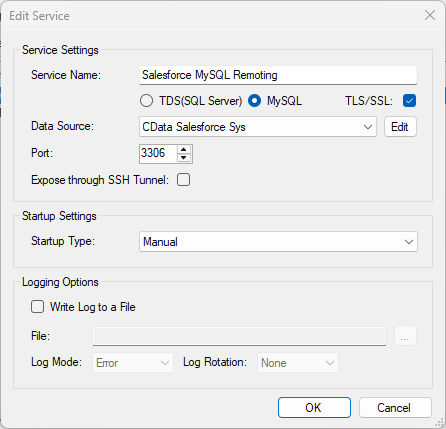
Create a FEDERATED Server and Tables for Short.io Data
After you have configured and started the service, create a FEDERATED server to simplify the process of creating FEDERATED tables:
Create a FEDERATED Server
The following statement will create a FEDERATED server based on the ODBC Driver for Short.io. Note that the username and password of the FEDERATED server must match a user account you defined on the Users tab of the SQL Gateway.
CREATE SERVER fedAPI
FOREIGN DATA WRAPPER mysql
OPTIONS (USER 'sql_gateway_user', PASSWORD 'sql_gateway_passwd', HOST 'sql_gateway_host', PORT ####, DATABASE 'CData API Sys');
Create a FEDERATED Table
To create a FEDERATED table using our newly created server, use the CONNECTION keyword and pass the name of the FEDERATED server and the remote table (Domains). Refer to the following template for the statement to create a FEDERATED table:
CREATE TABLE fed_domains (
  ...,
    TYPE(LEN),
    TYPE(LEN),
  ...,
)
ENGINE=FEDERATED
DEFAULT CHARSET=latin1
CONNECTION='fedAPI/domains';
NOTE: The table schema for the FEDERATED table must match the remote table schema exactly. You can always connect directly to the MySQL remoting service using any MySQL client and run a SHOW CREATE TABLE query to get the table schema.
Execute Queries
You can now execute queries to the Short.io FEDERATED tables from any tool that can connect to MySQL, which is particularly useful if you need to JOIN data from a local table with data from Short.io. Refer to the following example:
SELECT
  fed_domains.,
  local_table.custom_field
FROM
  local_table
JOIN
  fed_domains
ON
  local_table.foreign_ = fed_domains.;