




Access UKG Pro HCM Data from MySQL in HeidiSQL

HeidiSQL is an open-source database administration tool that natively supports MariaDB, MySQL, SQL Server, and PostgreSQL. When paired with the CData API Driver for ODBC and SQL Gateway, HediSQL's reach extends to include access to live UKG Pro HCM data. This article demonstrates how to connect to on-premise UKG Pro HCM and query UKG Pro HCM data in HeidiSQL.
Connect to UKG Pro HCM Data
If you have not already done so, provide values for the required connection properties in the data source name (DSN). You can use the built-in Microsoft ODBC Data Source Administrator to configure the DSN. This is also the last step of the driver installation. See the "Getting Started" chapter in the help documentation for a guide to using the Microsoft ODBC Data Source Administrator to create and configure a DSN.
Start by setting the Profile connection property to the location of the UKGProHCM Profile on disk (e.g. C:\profiles\UKGProHCM.apip). Next, set the ProfileSettings connection property to the connection string for UKGProHCM (see below).
UKGProHCM API Profile Settings
UKG Pro HCM uses Basic authentication combined with a customer API key to authorize access to the API. To connect, you will need your UKG Pro HCM credentials and a customer API key issued by UKG.
Set the following connection properties to authenticate:
- AuthScheme: Set this to Basic.
- User: Set this to your UKG Pro HCM username.
- Password: Set this to your UKG Pro HCM password.
- ProfileSettings: Set this to a semicolon-separated list containing:
- Host: Your UKG Pro HCM tenant hostname (e.g., yourcompany.ultipro.com).
- CustomerAPIKey: Your UKG customer API key. This is passed as the US-CUSTOMER-API-KEY request header on each API call.
To obtain your customer API key, contact your UKG Pro HCM administrator or refer to the UKG Developer Portal at https://developer.ukg.com.
When you configure the DSN, you may also want to set the Max Rows connection property. This will limit the number of rows returned, which is especially helpful for improving performance when designing reports and visualizations.
Configure the SQL Gateway
See the SQL Gateway Overview to set up connectivity to UKG Pro HCM data as a virtual MySQL database. You will configure a MySQL remoting service that listens for MySQL requests from clients. The service can be configured in the SQL Gateway UI.
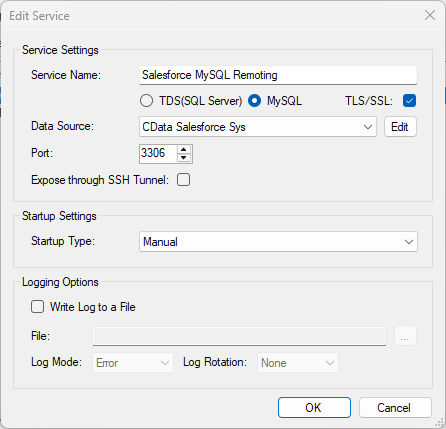
To connect to the SQL Gateway from HeidiSQL, you will need to run the SQL Gateway on a web-facing machine. After configuring the SQL Gateway, make note of the following information:
- The IP address or domain name of the machine hosting the SQL Gateway
- The data source name (likely CData API Sys) of the MySQL service
- The port number of the MySQL service
- The credentials of a SQL Gateway user with access to the service
Configure Remote Access
If your ODBC Driver and the remoting service are installed on-premise (and not accessible from HeidiSQL), you can use the reverse SSH tunneling feature to enable remote access. For detailed instructions, read our Knowledge Base article: SQL Gateway SSH Tunneling Capabilities.
Connect to UKG Pro HCM in HeidiSQL
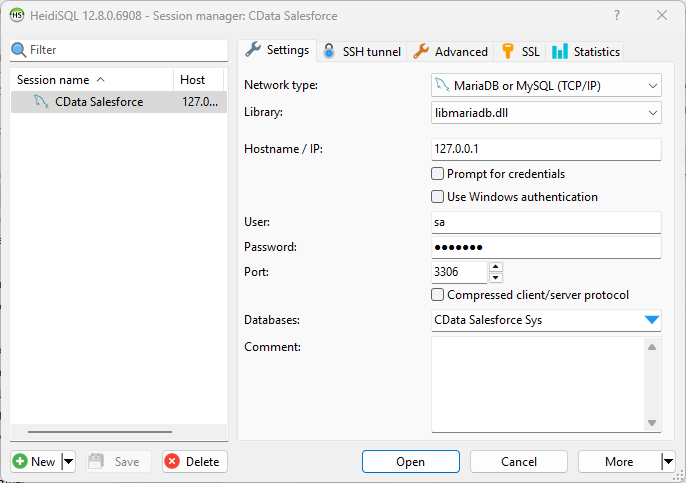
Once you have a MySQL Service configured for the CData API Driver for ODBC, you are ready to connect to the data in HeidiSQL. Start by creating a new connection Session in HeidiSQL, then choose the MySQL library type.
Configure the data set using the values for the MySQL service for UKG Pro HCM you configured in SQL Gateway (be sure to use the DSN for the database name). Validate your connection and click Open.
Query UKG Pro HCM from HeidiSQL
- In the database listing on the left, find your connection to UKG Pro HCM configured earlier.
- In the database listing on the left, expand the appropriate connection and to view individual tables or data objects present within UKG Pro HCM.
- Write custom SQL queries targeting these tables, treating the data source like any SQL Server database, or visually explore each tabular data set by selecting the relevant tables
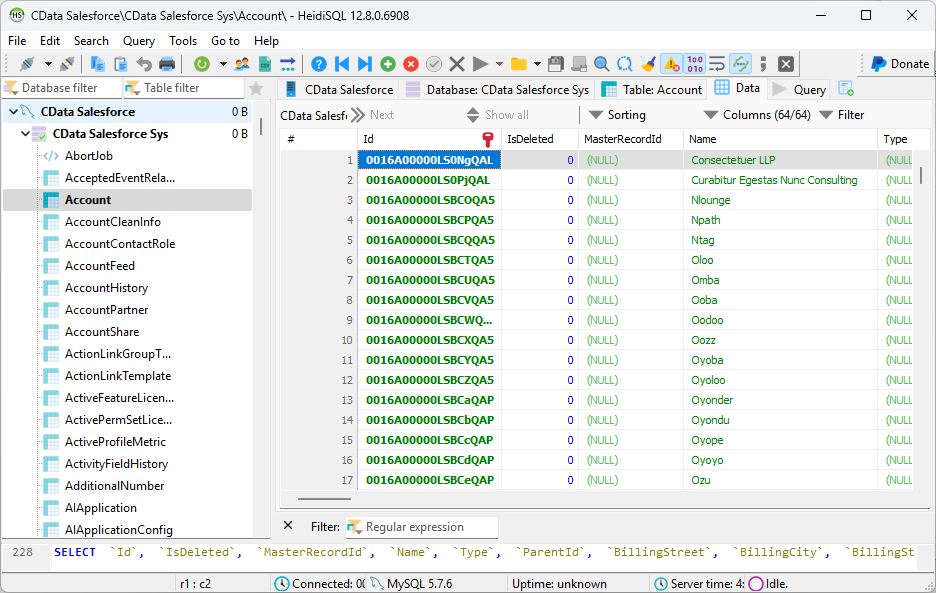
With the CData API Driver for ODBC and SQL Gateway, you are able to easily query data from UKG Pro HCM data in HeidiSQL. If you have any questions, such as needing to access your on-premises data from HeidiSQL, let our Support Team know.