




Access UKG Pro HCM Data from MySQL in PHP

You can use the CData SQL Gateway and ODBC Driver for UKG Pro HCM to access UKG Pro HCM data from MySQL clients, without needing to perform an ETL or cache data. Follow the steps below to connect to UKG Pro HCM data in real time through PHP's standard MySQL interfaces, mysqli and PDO_MySQL.
Connect to UKG Pro HCM Data
If you have not already done so, provide values for the required connection properties in the data source name (DSN). You can use the built-in Microsoft ODBC Data Source Administrator to configure the DSN. This is also the last step of the driver installation. See the "Getting Started" chapter in the help documentation for a guide to using the Microsoft ODBC Data Source Administrator to create and configure a DSN.
Start by setting the Profile connection property to the location of the UKGProHCM Profile on disk (e.g. C:\profiles\UKGProHCM.apip). Next, set the ProfileSettings connection property to the connection string for UKGProHCM (see below).
UKGProHCM API Profile Settings
UKG Pro HCM uses Basic authentication combined with a customer API key to authorize access to the API. To connect, you will need your UKG Pro HCM credentials and a customer API key issued by UKG.
Set the following connection properties to authenticate:
- AuthScheme: Set this to Basic.
- User: Set this to your UKG Pro HCM username.
- Password: Set this to your UKG Pro HCM password.
- ProfileSettings: Set this to a semicolon-separated list containing:
- Host: Your UKG Pro HCM tenant hostname (e.g., yourcompany.ultipro.com).
- CustomerAPIKey: Your UKG customer API key. This is passed as the US-CUSTOMER-API-KEY request header on each API call.
To obtain your customer API key, contact your UKG Pro HCM administrator or refer to the UKG Developer Portal at https://developer.ukg.com.
Configure the SQL Gateway
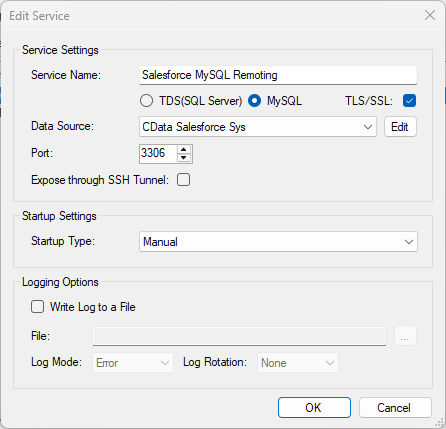
See the SQL Gateway Overview to set up connectivity to UKG Pro HCM data as a virtual MySQL database. You will configure a MySQL remoting service that listens for MySQL requests from clients. The service can be configured in the SQL Gateway UI.
Connect in PHP
The following examples show how to use object-oriented interfaces to connect and execute queries. Initialize the connection object with the following parameters to connect to the virtual MySQL database:
- Host: Specify the remote host location where the service is running. In this case "localhost" is used for the remote host setting since the service is running on the local machine.
- Username: Specify the username for a user you authorized on the SQL Gateway's Users tab.
- Password: Specify the password for the authorized user account.
- Database Name: Specify the system DSN as the database name.
- Port: Specify the port the service is running on; port 3306 in this example.
mysqli
<?php
$mysqli = new mysqli("localhost", "user", "password", "CData API Sys","3306");
?>
PDO
<?php
$pdo = new PDO('mysql:host=localhost;dbname=CData API Sys;port=3306', 'user', 'password');
?>
Query in PHP
With the connection established, you can then access tables. The following steps walk through the example:
- Query the table; for example, UserDetails. The results will be stored as an associative array in the $result object.
- Iterate over each row and column, printing the values to display in the PHP page.
- Close the connection.
mysqli
$result = $mysqli->query("SELECT UserId, UserName FROM UserDetails WHERE UserStatus = 'A'");
while($row = $result->fetch_assoc()) {
  foreach ($row as $k=>$v) {
    echo "$k : $v";
    echo "<br>";
  }
}
$mysqli->close();
PDO
$result = $pdo->query("SELECT UserId, UserName FROM UserDetails WHERE UserStatus = 'A'");
while($row = $result->fetch(PDO::FETCH_ASSOC)) {
  foreach ($row as $k=>$v) {
    echo "$k : $v";
    echo "<br>";
  }
}
$result = null;
$pdo = null;