




Design BIRT Reports on UKG Pro WFM Data

The CData JDBC Driver for UKG Pro WFM integrates connectivity to UKG Pro WFM APIs into your data-driven Java applications. You can use the CData JDBC Driver for UKG Pro WFM with the BIRT (Business Intelligence Reporting Tools) platform to create BIRT reports that reflect changes to your data in real time.
- If you have not already done so, install the BIRT Framework plugin and the Database Development plugin for Eclipse.
- Click File -> New -> Report. The Report Design perspective is opened.
- In the Data Explorer, right-click Data Sources and click New Data Source.
- Select the Create from a Data Source Type in the Following List option and select JDBC Data Source.
- Click Manage Drivers and add the driver JAR, located in the lib subfolder of the installation folder.
- In the Database URL box, enter the JDBC URL containing the connection string.
Start by setting the Profile connection property to the location of the UKGProWFM Profile on disk (e.g. C:\profiles\UKGProWFM.apip). Next, set the ProfileSettings connection property to the connection string for UKGProWFM (see below).
UKGProWFM API Profile Settings
UKG Pro Workforce Management uses OAuth 2.0 with the Resource Owner Password Credentials grant (grant_type=password) to authorize access to the API. Unlike most OAuth-based profiles, this does not use a browser redirect/authorization-code step: the driver exchanges your UKG Pro WFM username, password, client ID, and client secret directly for an access token.
Set the following connection properties to authenticate:
- AuthScheme: Set this to OAuthPassword.
- Host: Set this to the hostname of your UKG Pro Workforce Management datacenter/tenant (for example, yourcompany.mykronos.com). Do not include the protocol (https://) or a trailing slash.
- OAuthClientId: Set this to the client ID issued for your UKG Pro Workforce Management OAuth application.
- OAuthClientSecret: Set this to the client secret issued for your UKG Pro Workforce Management OAuth application.
- User: Set this to your UKG Pro Workforce Management username.
- Password: Set this to your UKG Pro Workforce Management password.
Access tokens are obtained from https://{Host}/api/authentication/access_token. Refresh tokens issued by UKG Pro Workforce Management expire after 7 days; if a refresh attempt fails because the refresh token itself has expired, the driver must re-authenticate with your User/Password credentials to obtain a new access token.
Built-in Connection String Designer
For assistance in constructing the JDBC URL, use the connection string designer built into the UKG Pro WFM JDBC Driver. Either double-click the JAR file or execute the jar file from the command-line.
java -jar cdata.jdbc.api.jarFill in the connection properties and copy the connection string to the clipboard.

When you configure the JDBC URL, you may also want to set the Max Rows connection property. This will limit the number of rows returned, which is especially helpful for improving performance when designing reports and visualizations.
A typical JDBC URL is below:
jdbc:api:Profile=C:\profiles\UKGProWFM.apip;AuthScheme=OAuthPassword;ProfileSettings='Host=yourcompany.mykronos.com;User=your_username;Password=your_password;';OAuthClientId=your_client_id;OAuthClientSecret=your_client_secret; - Right-click the Data Sets folder and select the JDBC data source for UKG Pro WFM.
- In the resulting dialog, build the SELECT query to be used to retrieve the data for the report. This article uses the following query:
SELECT PersonNumber, UserName FROM Employees WHERE PersonId = '12345' - In the Palette, drag a Chart onto the editor. The chart wizard is displayed.
- After selecting the chart type, drag columns onto the chart fields on the Select Data tab.
- Click Run -> View Report -> In Web Viewer to view the report.
Your BIRT reports can now pick up any updates to UKG Pro WFM data.
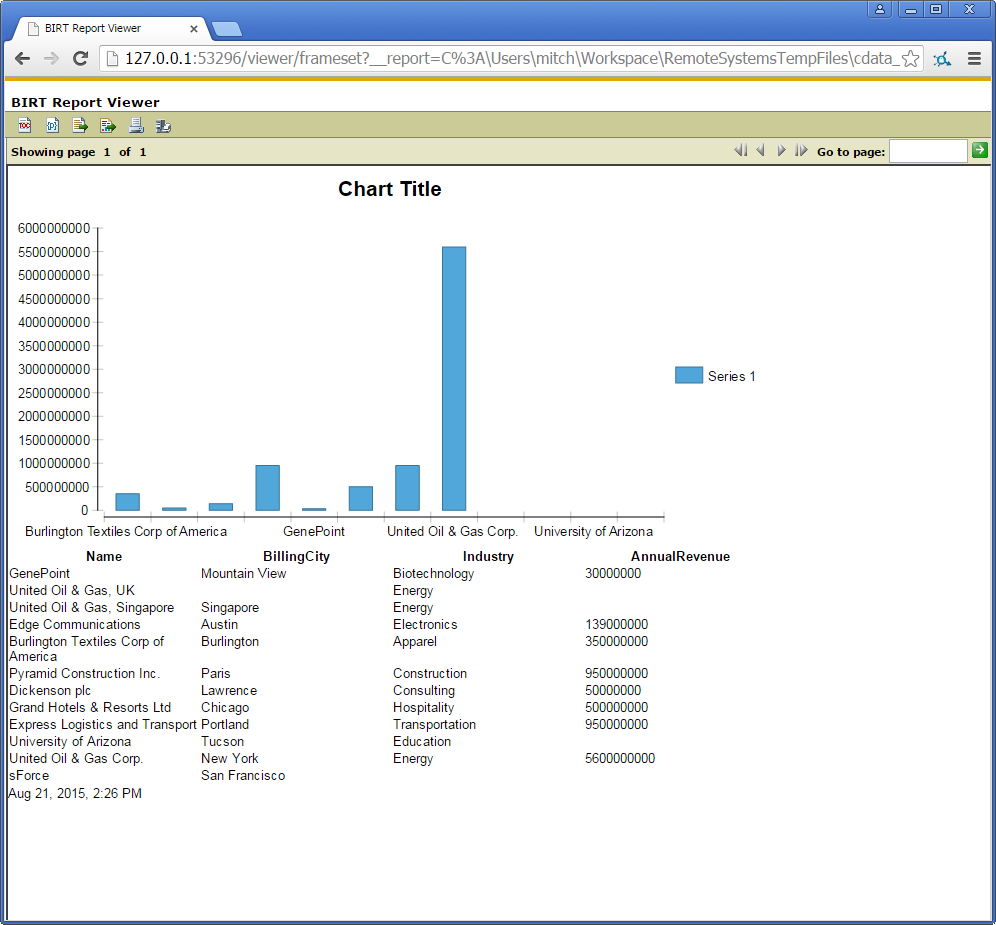
To publish the report to your application server, add the driver JAR to the BIRT Viewer's classpath. For more information, see the CData KB for guides to deploying the JDBC Driver on Java application servers.