




Query UKG Pro WFM Data through ODBC in Node.js

Node.js is a JavaScript runtime environment that allows you to run JavaScript code outside of a browser. With the CData API Driver for ODBC, you can access live UKG Pro WFM data from Node.js apps and scripts. In this article, we walk through installing node-odbc and the required tools to create a simple Node.js app with access to live UKG Pro WFM data.
With built-in optimized data processing, the CData ODBC Driver offers unmatched performance for interacting with live UKG Pro WFM data in Node.js. When you issue complex SQL queries from Node.js to UKG Pro WFM, the driver pushes supported SQL operations, like filters and aggregations, directly to UKG Pro WFM and utilizes the embedded SQL engine to process unsupported operations client-side (often SQL functions and JOIN operations).
Connecting to UKG Pro WFM Data
If you have not already done so, provide values for the required connection properties in the data source name (DSN). You can use the built-in Microsoft ODBC Data Source Administrator to configure the DSN. This is also the last step of the driver installation. See the "Getting Started" chapter in the help documentation for a guide to using the Microsoft ODBC Data Source Administrator to create and configure a DSN.
Start by setting the Profile connection property to the location of the UKGProWFM Profile on disk (e.g. C:\profiles\UKGProWFM.apip). Next, set the ProfileSettings connection property to the connection string for UKGProWFM (see below).
UKGProWFM API Profile Settings
UKG Pro Workforce Management uses OAuth 2.0 with the Resource Owner Password Credentials grant (grant_type=password) to authorize access to the API. Unlike most OAuth-based profiles, this does not use a browser redirect/authorization-code step: the driver exchanges your UKG Pro WFM username, password, client ID, and client secret directly for an access token.
Set the following connection properties to authenticate:
- AuthScheme: Set this to OAuthPassword.
- Host: Set this to the hostname of your UKG Pro Workforce Management datacenter/tenant (for example, yourcompany.mykronos.com). Do not include the protocol (https://) or a trailing slash.
- OAuthClientId: Set this to the client ID issued for your UKG Pro Workforce Management OAuth application.
- OAuthClientSecret: Set this to the client secret issued for your UKG Pro Workforce Management OAuth application.
- User: Set this to your UKG Pro Workforce Management username.
- Password: Set this to your UKG Pro Workforce Management password.
Access tokens are obtained from https://{Host}/api/authentication/access_token. Refresh tokens issued by UKG Pro Workforce Management expire after 7 days; if a refresh attempt fails because the refresh token itself has expired, the driver must re-authenticate with your User/Password credentials to obtain a new access token.
Building node-odbc
In order to connect to UKG Pro WFM through the CData ODBC Driver, you need to build node-odbc manually (after installing the required tools).
Installing the Required Tools
The following commands install the tools required to build node-odbc (note the -g parameter, which installs the tools globally).
npm i -g windows-build-tools
npm i -g node-gyp
Building node-odbc
After installing the required tools, create a directory for the Node.js app and install odbc (which builds the binary for us to use in our Node.js script).
mkdir nodeodbc
cd nodeodbc
npm i -g node
Querying UKG Pro WFM from Node.js
With the ODBC Driver installed, a DSN Configured, and node-odbc built, we are ready to query live UKG Pro WFM data from a Node.js app. The sample code below connects to a specific DSN and queries the Employees table.
myscript.js
const odbc = require('odbc');

async function queryAPI() {
    const connection = await odbc.connect(`DSN=CData API Source`);
    const data = await connection.query('SELECT PersonNumber, UserName FROM Employees');
    console.log(data);
}

queryAPI();
Once you write the app, use node to execute the script:
node myscript.js
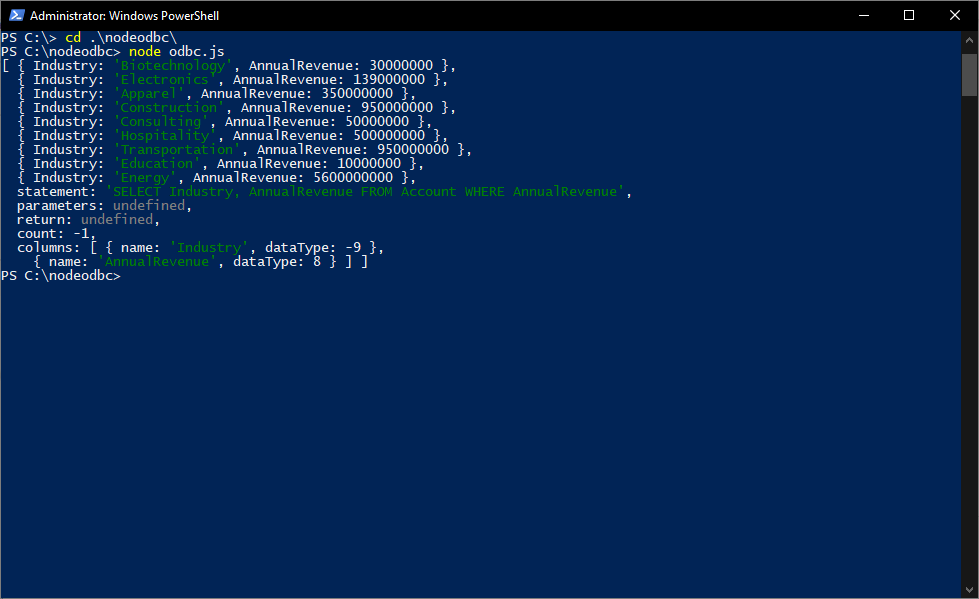
Download a free, 30-day trial of the CData API Driver for ODBC and start working with your live UKG Pro WFM data in Node.js. Reach out to our Support Team if you have any questions.