If you have ever tried giving a finance team instant, self-service access to data that lives across multiple enterprise systems, you know it is rarely a simple task. But connecting that critical financial data to an LLM-powered assistant is a must if you want to eliminate manual reporting and help your business move faster.
This guide explains how we used an AI coding assistant to build a natural language finance assistant using CData Connect AI as the governed data layer. It includes a working application - CFO Copilot - to demonstrate this architecture end to end. Whether you are exploring how to connect LLMs to live enterprise data or looking to build a similar application for your own teams, the architecture, prompts, and patterns here will help you move from concept to a working prototype.
Understanding the problem
Before you start building, you need to know exactly what makes this problem hard in the first place. Let's break down the core challenges IT teams face when supporting finance.
Finance teams need a number. That number lives in Sage Intacct for accounts payable and receivable, in Salesforce for pipeline and CRM data, and maybe in a spreadsheet somewhere. Every time your Finance team needs a number, someone on your team must pull from each source, normalize the formats, reconcile the values, and deliver the result. That process takes hours, and sometimes even days.
And if you multiply it across every reporting cycle, every board meeting, every ad-hoc request, and your team is spending 10 to 15 hours a week assembling reports manually.
It gets worse when the infrastructure changes. When companies migrate between ERPs, let's say, SAP to NetSuite, every integration breaks because someone hardcoded it to the previous system's API. You need to start from scratch again, and it can be frustrating.
The root cause is not a shortage of tools. The data is fragmented across systems, and no unified, governed layer exists for an AI application to access it all.
The rationale for using CData Connect AI
So how do you give an LLM unified access to data that lives across a dozen systems? You put a governed layer in-between, and that is exactly what CData Connect AI provides.
CData Connect AI exposes your enterprise data sources through an MCP (Model Context Protocol) server. It acts as a universal adapter between LLMs and business data. Instead of writing custom connectors for every data source your finance team uses, you point your LLM at CData Connect AI's single MCP endpoint, and it handles authentication, query translation, schema discovery, and access governance on your behalf.
Now, if you were to build a natural language data tool from scratch by creating a custom Sage Intacct integration, a separate Salesforce integration, adding a normalization layer to unify both schemas, and then layering governance on top, that would take months of work. But if you route everything through Connect AI's MCP endpoint, you reduce all of that to standard SQL queries against a single governed interface. The integration effort drops from a quarter-long project to a weekend prototype.
For a deeper look at how CData MCP servers connect AI to enterprise data, this technical overview covers the underlying architecture.
Plan your architecture
Building a natural language data assistant requires a clear, layered architecture. Without a proper plan, your team can easily feel overwhelmed by LLM integration complexity, data source connectivity, and prompt engineering challenges all at once.
Here is the layered approach used for CFO Copilot. You can use a similar approach for any application you want to build.
Data layer: Connect AI handles all connectivity to over 350 data sources through a single MCP endpoint.
Backend layer: Express.js orchestrates a three-step query pipeline; natural language to SQL, SQL execution via MCP, and result formatting.
LLM layer: LLM processes natural language queries, generates SQL, and formats the results for the frontend.
Frontend layer: React renders the formatted responses with inline charts and data tables.
Here is a quick planning checklist:
Identify your target data sources and confirm they are accessible through Connect AI.
Decide on your LLM providers and configure at least one API key.
Map out the tables and columns your users will query most frequently. These inform the prompts your AI coding agent will use to scaffold the application.
Define your user roles and access levels before you start building the frontend.
Build the application with AI coding agents and Connect AI MCP
Connect AI's MCP integration changes the development workflow entirely. Instead of manually writing connectors, building schemas, and wiring up API calls, you connect your AI coding agent directly to the Connect AI MCP server and let it discover your data sources, understand the available tables, and scaffold the application for you.
Let's go over the complete process to build an application with Connect AI MCP.
The first step is to connect Connect AI's MCP server to your AI coding agent, and for this example the coding agent used is Claude. If you need the exact steps to connect both, check out the step-by-step guide on how to connect CData Connect AI to Claude. You can also watch the Claude Remote MCP setup walkthrough for a visual guide.
With Connect AI connected to Claude, head to the chat and instruct it to read the MCP's tools and available data sources. Once the agent understands the MCP's capabilities, give it a detailed requirements prompt that describes the full application.
Here is the prompt used for CFO Copilot (modify it to fit your needs):
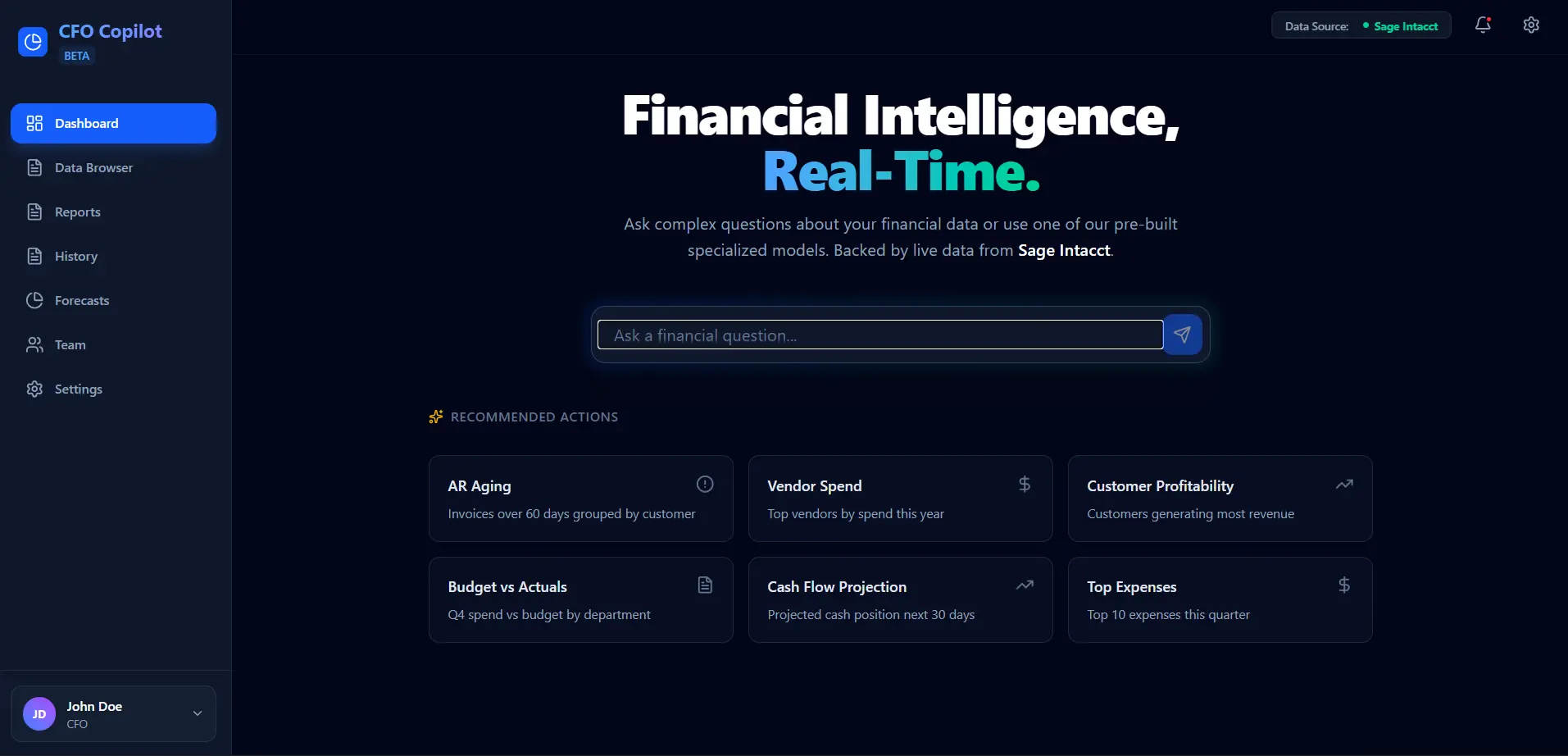
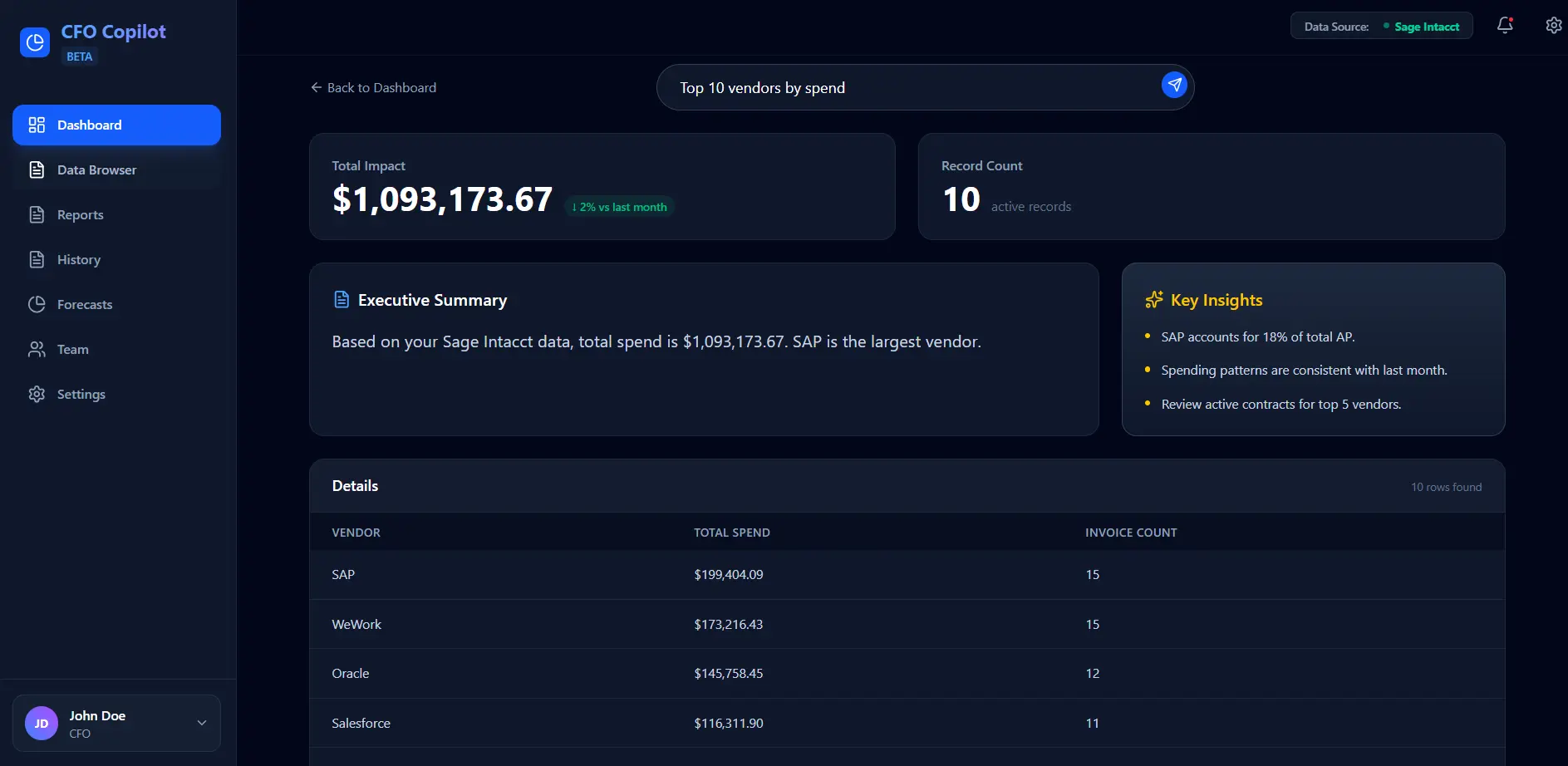
"Build a financial assistant app using React, Vite, TypeScript, and Tailwind CSS, powered by CData Connect AI's MCP for live data access. The app needs a natural language dashboard with pre-built query cards (AR aging, vendor spend, CRM pipeline, won deals, top expenses), a data browser for exploring raw tables with search and pagination, a chat-based report assistant that renders charts inline, a query history tab with re-run capability, and role-based access for three personas - CFO with full visibility, Controller with operational focus, and AP Clerk with sensitive data masked. The AI agent has to understand finance terminology (COGS, EBITDA, DSO, working capital), fiscal periods, and GL account structures, and return clear tables, summaries, and calculations with no hallucinated numbers."
That is it! Since the AI coding agent has direct access to the Connect AI MCP, it reads the available table schemas automatically and builds an entire application against real data structures.
The result is a fully working application with a frontend, backend, and data connectivity built from a single requirements prompt and a live MCP connection. From here, you can iterate and refine the application with follow-up prompts, adding features, adjusting the UI, or expanding to additional data sources as your requirements evolve.
Implement role-based access control in Connect AI
When managing sensitive financial data, strict access control is essential. You must ensure that users only see the data appropriate to their role throughout the entire application.
This application implements three roles, each with a different level of data visibility:
Role | Access Level |
CFO | Full access to all financial data and insights |
Controller | Full data visibility with operational focus |
AP Clerk | Restricted access. The application masks sensitive figures with placeholders |
In a production environment, enforce these controls at the Connect AI interface. By configuring separate connection profiles for each role, you can ensure that restricted data never leaves the system.
Validate what Connect AI replaces
To put a concrete frame around the value Connect AI delivers, let's look at what you would need to build without it versus what you actually need with it:
Concern | Without Connect AI | With Connect AI |
Data source access | Custom API integration, session management, proprietary query syntax | Standard SQL via MCP endpoint |
Credential management | Rotate and manage credentials per source independently | Single authentication token |
Access governance | Build a custom authorization layer | Configured at the Connect AI level |
Maintenance | Update integrations when source APIs change | CData maintains the connectors |
Extend this pattern beyond finance
CFO Copilot addresses one use case. But the underlying architecture applies wherever your team needs to give AI governed access to enterprise data:
IT operations: An IT ops team could use the same pattern to build an assistant that surfaces SLA breaches across Jira tickets in real time.
HR analytics: An HR team could track attrition rates by department over the last 12 months without waiting on a data analyst to pull the numbers.
Sales intelligence: A revenue ops team could identify high-probability pipeline deals closing this quarter and flag them for executive review.
Supply chain: A logistics team could monitor average fulfillment times by warehouse and catch slowdowns before they impact delivery SLAs.
In every case, the workflow is the same: connect your AI coding agent to the Connect AI MCP, let it discover your data, give it a detailed requirements prompt, and build. The data sources and questions may change, but the pattern stays the same.
Get started
The full source code is on GitHub.
Here is a quick-start checklist:
Clone the repository and run npm install
Create a .env file with your Connect AI credentials
Add at least one LLM API key (any free LLM API key to start with)
Run npm run dev to start both the React frontend and Express backend
With a CData Connect AI account and an LLM API key, you can have this running in under 10 minutes.
Start building AI-powered tools with CData Connect AI
Building a natural language data tool does not have to mean months of custom integration work. With CData Connect AI handling governed data access through a single MCP endpoint, your team can focus on the application, not the plumbing.
Start a 14-day free trial today and build your own application!




