Reporting used to be a frustrating process for me and I’m sure many others felt the same pains. Reports took weeks to be built, they weren’t updated regularly, or you couldn’t find the report you’re actually looking for because a different team used a different dashboard app.
Like other growing enterprises, CData used to have reporting spread across Power BI, Tableau, Salesforce, and a handful of other solutions. In my last post I covered how CData now has AI-enabled reporting that allows any team to build and publish reports in one place through Claude, Connect AI, and our internal report server: CData Reports. This post will cover what has changed now that every team has one place for centralized reporting and how CData Connect AI means we can trust the numbers behind those reports.
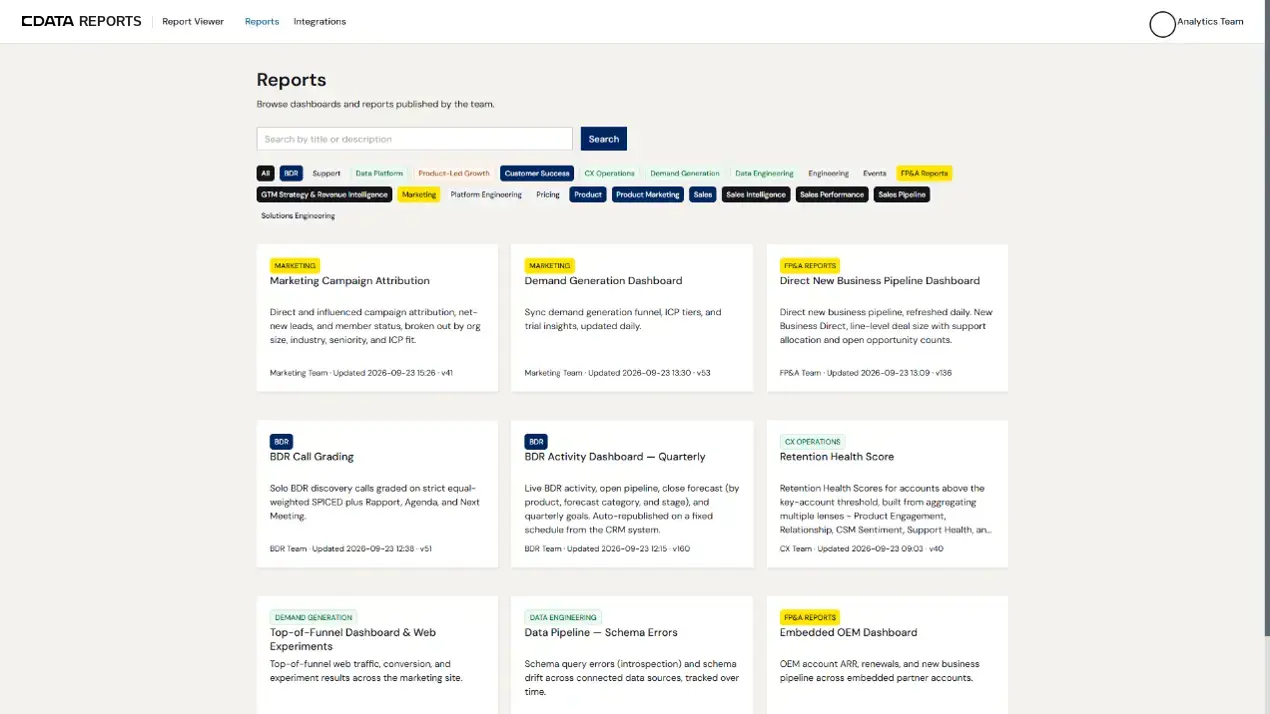
Where reports lived before CData Reports
Before we had centralized reporting, we had reports and dashboards spread across multiple tools and teams, so only some knew which ones were current, trustworthy, or even existed in the first place. This introduced “report sprawl.” Some teams built exclusively in Power BI, others used Tableau, and some were early adopters of AI-enabled reporting. And lots of people lacked visibility into most of the reports all together, which meant they missed out on valuable insights.
The tools we used before worked well, and some teams still use specialized dashboards that have been maintained in those tools for years. That won’t change anytime soon, but CData Reports lets every team move their high-visibility and cross-functional reports to a central place, so everyone knows where to find them.
The problems that report sprawl introduced now look way different with every team using CData Reports:
What people need | Before | With CData Reports |
Finding a report | Had to know who to ask and which tool to check | One searchable hub every team publishes to |
Getting access | Request tool licenses and workspace invites, granted one by one | The company sign-in people already have |
Getting a new report | A request to a data or analyst team and a manager, then a wait | Building it in Claude on live data from Connect AI |
Seeing across teams | Separate reports in separate tools for separate teams | Reports that combine data, plans, and results across teams |
A governed, live data layer under every report
The most important part of every report is the data that sits underneath the insights. In the past, we relied on the data team to bring trustworthy data. But, with the roll out of AI tooling, more teams across the business want a level of self-service reporting, where they can access the data directly and build their own dashboards and metrics. This new process moves quickly, and requires a governed, live data layer that users and AI agents can fetch data from reliably.
CData employees trust the numbers in CData Reports because each report pulls from live sources through the Connect AI Gateway. Most team members use Claude to build and publish reports, and Connect AI is what enables Claude, and any other AI tool, to get governed, live access to enterprise systems so that it can answer their business questions while pulling from the systems they use day to day.
Because that live data access is so important for us, we tested the accuracy of our own integration. In CData Labs benchmark testing, Connect AI answered 98.5% of enterprise queries correctly, compared with 65% to 75% for other MCP providers (see the full results). That benchmark measures Connect AI rather than CData Reports itself, but Connect AI is the layer every report depends on for the data underneath them.
Additionally, CData team members take advantage of the Context Engine in Connect AI, which adds business context on top of the accuracy our connectors provide. The context graph holds metric definitions, business rules, and table relationships, so Claude and other AI tools work from the same definitions your teams use.
Report access tied to each person’s identity
Under the old way of reporting, getting into a report often meant requesting a license, waiting on a workspace invite, or asking someone with access to export a CSV that becomes stale right away. Now, every report sits behind our company sign-in that we use for everything else at CData. Access is no longer managed by separate BI tool licenses and permission grants in different systems.
Plus, that same identity is passed down from viewing the report all the way to building the report from scratch. Connect AI uses the same user identity as CData Reports and passes that identity down to the data source. This means that when Claude fetches data from a business system for a user, it uses that person’s identity, from the first prompt to the published report.
When I build a report in Claude, I am accessing Salesforce and Jira with my identity, and I can only see what I already have access to. The access is governed under my identity, and Connect AI logs every query and action, so there’s always a record of who pulled what and when.
Reports that AI keeps up to date
Another advantage for us using CData Reports now is that updating these dashboards is as simple as a single prompt to update and re-publish. Or, for more advanced AI-users, have an AI agent that monitors, updates, and manages all the reports they created. This means that updates no longer rely on another ticket with the data and analyst teams; everything can be self-serviced through your AI tool and the governed, live data layer with Connect AI.
Every team at CData uses the same centralized reporting layer now, including marketing, sales, support, customer success, HR, finance, engineering, and product. And because we all publish to CData Reports, reports can be built that cross teams and functions, putting plans, data, and results from different teams’ side-by-side for insights that weren’t possible when each team ran different reporting tools
How to bring centralized reporting with AI to your team
If you are looking to mimic what we are doing at CData, you don't need CData Reports to do this. It's our own internal app, so you'd pick and build your own place to publish, but the pattern carries over:
Start with a governed data layer. Give AI tools and users live access to your systems under each person's own permissions, so every report starts with trusted data. Check out Connect AI Gateway here!
Pick one default place to publish. The tool you end up choosing matters less than everyone in the org knowing it's the first place to look and publish to.
Tie access to identity. Use the sign-in people already have instead of separate licenses for each tool.
Automate updates for the reports people use most. If your publishing location exposes an MCP server, agents can refresh reports on a schedule. This KB article walks through the setup we use.
Build across teams once the basics are in place. Cross-team and cross-function reports are where having everything in one place pays off most and where you get insights you haven’t seen before.
Build governed reports on live data with CData Connect AI
Centralized reporting with AI works when every report draws on live data under the right permissions. With CData Connect AI, you can give Claude and other AI tools governed access to Salesforce, Snowflake, and hundreds of other sources.
Start a free trial and publish your first report on live data this week.
Frequently asked questions
What is centralized reporting with AI?
It's a model where reports built in AI tools like Claude are published to one shared place that anyone in the company can search. Access is tied to each person's company identity, and the reports run on live, governed data instead of exports.
How do you prevent report sprawl when everyone builds reports with AI?
Give people one default place to publish and make it easy to search, so they find existing reports before building new ones. Then put a governed data layer underneath, so every report draws on the same live sources and the numbers line up.
Can AI agents keep reports updated automatically?
Yes. If the place you publish reports exposes an MCP server, an agent can query live data on a schedule and republish a report. It's still worth having a person own each report, so someone notices when a number looks off.
Who can see a report in CData Reports?
Everyone signs in with their CData identity. When someone builds a report, Connect AI queries source systems under that person's own permissions and logs every query.
Can I buy CData Reports?
No. CData Reports is an internal app CData built for its own teams. The governed, live data access underneath it comes from CData Connect AI, which works with Claude, Copilot, and other AI tools.