ChatGPT and Meta Muse can both draft an email or summarize a meeting. Ask either one which renewals are at risk this quarter, though, and the answer depends on whether it can access the customer relationship management (CRM) system, the support desk, and the finance system that hold that information. Both assistants connect to those systems through model context protocol (MCP) servers, new ones show up every week, and they don’t all solve the same problem. This guide sorts the best MCP servers for ChatGPT and Muse by what each one is good at, starting with the questions a business team should ask before approving one.
At a glance (updated October 20, 2026)
MCP server: a connector that lets an AI assistant read from, and sometimes act in, a business system such as Salesforce or Jira, within limits an admin sets. MCP is the open standard both ChatGPT and Muse use for this (MCP specification).
ChatGPT: MCP servers show up as plugins. In Enterprise workspaces, admins decide who can install them and whether they can make changes (OpenAI plugin controls).
ChatGPT dots: always-on personal agents that use the plugins already installed on your account. Available on Pro and Business Premium, and as an admin-enabled beta on Enterprise (OpenAI dots docs).
Meta Muse: Meta’s personal AI agent, launched September 8, 2026 (Meta). Meta Muse connectors come built in for common apps, and you can add custom ones, which Meta doesn’t review (Meta Help Center).
How this guide was tested: product capabilities come from each vendor’s documentation, checked October 20, 2026. I tested CData Connect AI in ChatGPT, a ChatGPT dot, and Muse, and Atlassian’s plugin in ChatGPT.
Quick picks by need
Email, files, and calendars: the assistant’s built-in connectors
Payments and billing: Stripe MCP
Jira and Confluence: Atlassian Rovo MCP
Questions that stay inside Salesforce: Salesforce hosted MCP (Enterprise Edition and above)
HubSpot CRM: HubSpot MCP
Actions across many software-as-a-service (SaaS) apps: Zapier MCP or Workato Enterprise MCP
Data already in a warehouse: the Snowflake, BigQuery, or Databricks MCP server
Secure, governed access across several business systems: CData Connect AI
What an MCP server does for ChatGPT and Meta Muse
An MCP server connects the assistant to one or more business systems. When you ask ChatGPT about open opportunities, the assistant calls a tool the server exposes (“search opportunities”), the server queries Salesforce on your behalf, and the result comes back into the chat. The assistant never holds your Salesforce password, and it can only do what the server’s tools allow.
For a business team, which server you pick matters more than which assistant you pick. The server’s configuration sets which systems the assistant can access, whose permissions apply, whether the assistant can change records, and whether anyone can see afterward what it did. For the deeper mechanics, see understanding and deploying MCP servers.
How to choose the best MCP servers for business use
Most “best MCP servers” lists are written for developers and rank servers by how many tools they expose. Rolling a server out to a sales, support, or finance team raises different questions, and these are the ones I’d ask of every option below:
Criterion | What to ask |
Reaches your systems | Does it cover the apps your team works in, including on-premises databases and enterprise resource planning (ERP) systems? |
Runs as the signed-in user | Does the assistant see only what that person could already see in the source system? |
Admin read-only control | Can an admin limit it to reading, per system or per role, outside the assistant? |
Audit log | Is there a record of every request and change, with who ran it? |
Answers across systems | Can one question combine data from two or more systems? |
Setup without developers | Can an admin or business user connect it without writing code? |
Audit logging varies the most. Vendor servers usually rely on each source system’s own audit features, so check the vendor’s audit docs. Pricing models differ too much to rank (per license, per task, or per seat). For more on the governance criteria, see giving ChatGPT and Claude governed access and the enterprise MCP servers buying guide.
Start with what’s already built in
Before adding any MCP server, check what the assistant already connects to. Built-in connectors come from the assistant’s vendor and don’t cost extra, and the only admin setup is turning them on.
ChatGPT has a public plugin directory with first-party and partner plugins. On Enterprise workspaces, “Use plugins” is on by default and “Create plugins with MCPs” (adding your own server) is off by default, so out of the box, the directory is where employees get plugins (OpenAI MCP docs). CData’s overview of ChatGPT Enterprise connectors covers what the built-ins handle well.
Meta Muse connectors cover personal and small-business tools. Muse for Small Business, announced September 29, 2026, adds Shopify, Slack, Notion, QuickBooks, Stripe, Zoom, and more (TechCrunch).
Neither list covers much of what a mid-size or large company runs on. Salesforce, HubSpot, Jira, Zendesk, ServiceNow, NetSuite, SAP, SharePoint, data warehouses, and on-premises SQL Server databases aren’t on Muse’s built-in list, and in ChatGPT they depend on which plugins your admin has approved. For those systems, you need an MCP server.
The best MCP servers for ChatGPT and Muse, by category
I left out the developer toolkits that wrap thousands of APIs, since they’re for engineers building their own agents and business users won’t set them up.
Vendor-hosted servers for a single app
Many software vendors now run an MCP server for their own product. If every question your team asks is about one app, start with that vendor’s server.
Salesforce hosted MCP servers. Available on Enterprise Edition and above, they run as the signed-in user, so sharing rules and field-level security apply (Salesforce Developers). CData tested it against Connect AI in native Salesforce MCP vs. Connect AI.
HubSpot MCP server. Reads and writes CRM records as the signed-in user (HubSpot Developers).
Atlassian Rovo MCP server. Jira and Confluence as the signed-in user, with ChatGPT listed as a supported client (Atlassian Support).
Stripe MCP server. An official ChatGPT plugin that requires confirmation for refunds and outbound payments (Stripe docs). See CData’s comparison of native and CData MCP servers for Stripe.
Microsoft Dataverse and Dynamics 365. Works with assistants outside Copilot once IT registers an app in Microsoft Entra (Microsoft Learn).
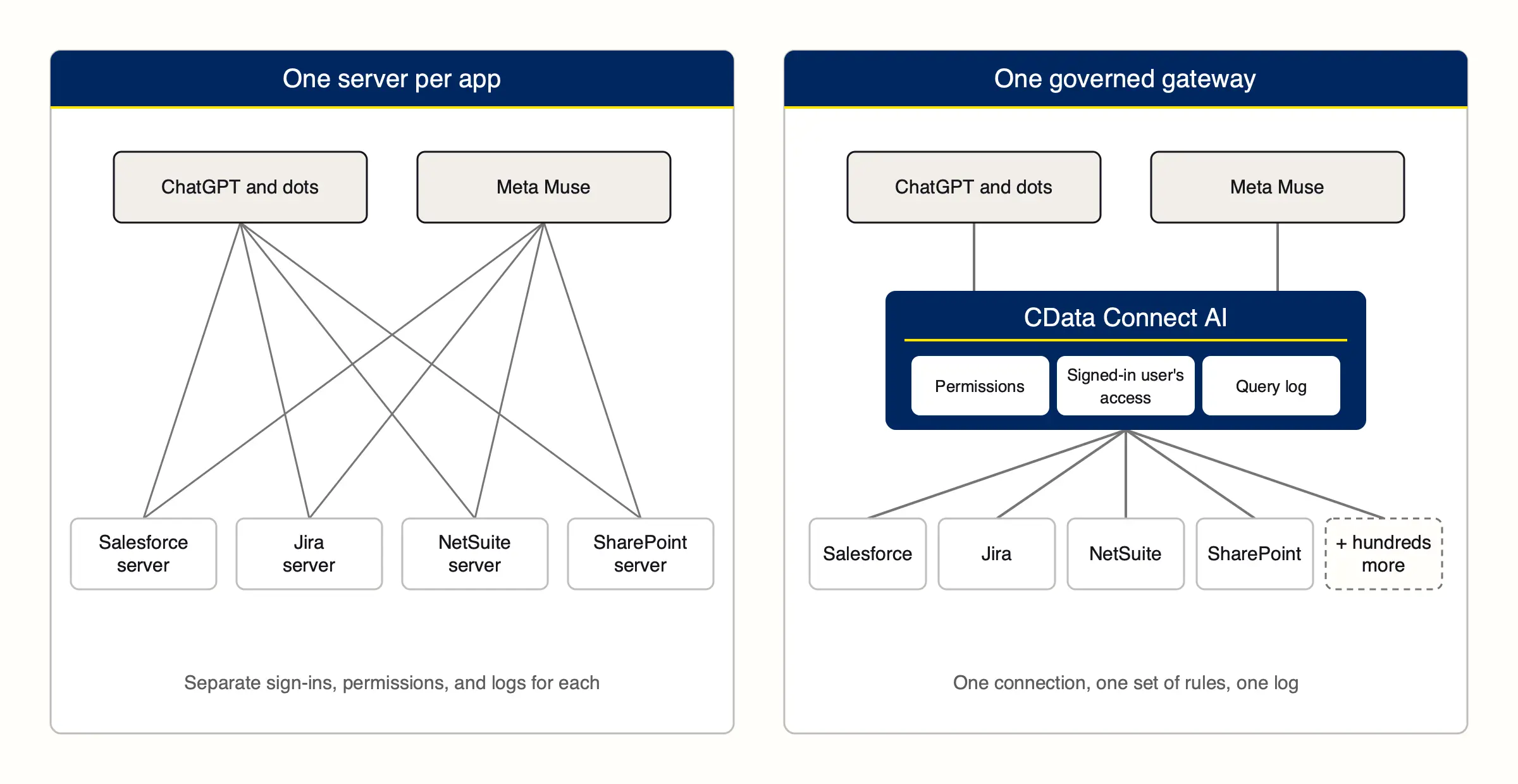
Vendor servers aren’t enough once a question spans apps, because each one sees only its own product. To answer “which accounts with open Jira escalations renew in Salesforce this quarter,” a team needs two servers with two sign-ins and two permission models, and the assistant has to match the records itself in the chat. I tried this with Atlassian’s official ChatGPT plugin. When I asked it about the Jira issues behind my largest open Salesforce deals, ChatGPT used the Atlassian plugin for Jira and pulled in the CData Connect AI plugin for Salesforce, then lined the two up in the conversation. It worked, with each plugin signed in and permissioned separately. CData’s comparison of three MCP approaches tests a vendor server side by side with other options.
Automation platforms
Zapier MCP and Workato Enterprise MCP turn each platform’s app catalog into actions an assistant can run, and both name ChatGPT as a client (Zapier docs, Workato). Zapier tool calls count against your Zapier task allowance, and Zapier is a built-in Muse connector (Zapier).
Both are good at doing things across a long tail of SaaS apps, like creating a ticket or posting to a channel. They’re built around workflows and per-task actions rather than live queries across large datasets, so reporting-style questions (“compare pipeline by region against last quarter’s bookings”) are a weaker fit. CData compared the two approaches in how CData compares to Zapier MCP.
Data warehouse servers
If your data is already consolidated in a warehouse, the warehouse’s own MCP server may be enough. Snowflake, Google BigQuery, and Databricks each run managed MCP servers that follow the warehouse’s own permissions (Snowflake docs, Google Cloud, Databricks docs). Snowflake and BigQuery document ChatGPT as a supported client, and the Databricks server is in beta as of October 2026.
These servers see only the data your pipelines have loaded, as of the last refresh. If someone asks about this morning’s support tickets, or about a system nobody loads into the warehouse, the warehouse server can’t help.
Governed data gateways
A governed data gateway puts one MCP server in front of many systems and applies the same permissions and logging to all of them. Several vendors now sell MCP gateways, and some focus on routing and securing tool calls for developers. CData Connect AI connects directly to business systems for end users and is built around security and governance: per-connection read and write permissions, the signed-in user’s own access, and a log of every interaction. It connects to hundreds of sources, including SaaS apps, databases, ERP systems, and on-premises systems, and queries them in place without copying data into a separate store (CData). It’s a plugin in ChatGPT’s public directory (ChatGPT) and works in Muse as a custom connector (CData KB).
A gateway is the better fit when questions cross systems, or when IT wants the same permissions and query log whichever assistant employees use.
MCP servers for ChatGPT and Muse compared
Option | Best for | Access control (from vendor docs) | Works in ChatGPT | Works in Muse |
Built-in plugins and connectors | Common tools such as email, files, and calendars | Managed by the assistant vendor and admin | Built in | Built in |
Vendor MCP servers (Salesforce, HubSpot, Atlassian, Stripe, Dynamics 365) | Questions inside one app | Usually runs as the signed-in user; varies by vendor | Varies by vendor | Varies by vendor |
Automation platforms (Zapier, Workato) | Actions across many SaaS apps | Connections managed in the platform | Documented | Zapier built in; Workato not documented |
Warehouse MCP servers (Snowflake, BigQuery, Databricks) | Data already in the warehouse | Warehouse roles and permissions | Documented (Snowflake, BigQuery) | Not documented |
CData Connect AI | Questions across many business systems | Read or write per connection, signed-in user’s access, query log | Documented | Documented |
Using MCP servers with ChatGPT dots
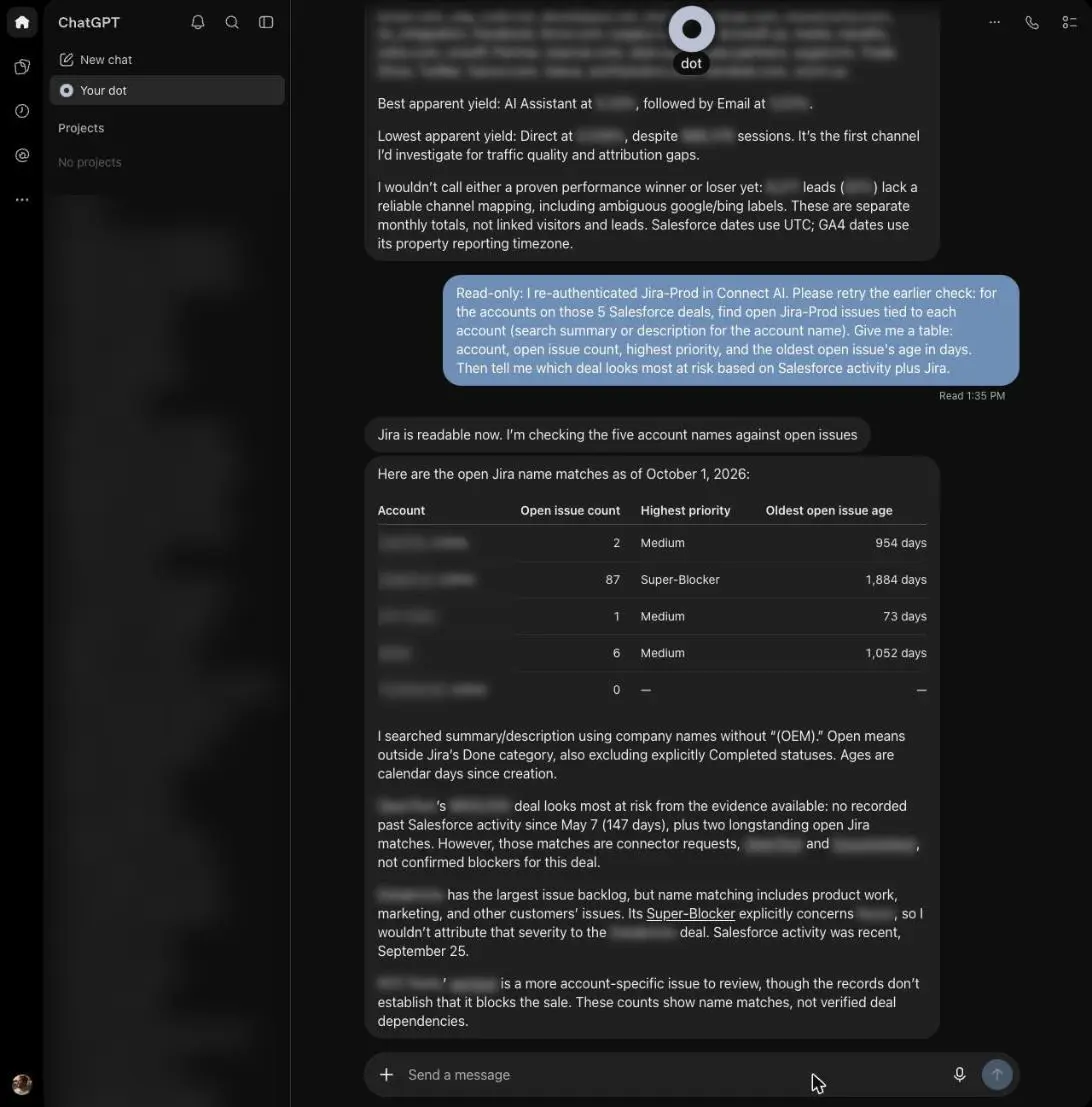
A dot keeps working between conversations: it runs scheduled checks and does background research with read-only tools (OpenAI dots admin guide). It uses the plugins already installed on your ChatGPT account, with the permissions you’ve already set (OpenAI).
In my test, the CData Connect AI plugin installed from the directory in about two minutes, and the dot used it right away. A question that combined my five largest open Salesforce deals with their open Jira issues took 4–7 minutes, so dots suit analysis more than quick lookups. With the plugin set to “Allow read-only tools,” the dot still created an Asana task I asked for, without an approval prompt, likely because OpenAI’s auto-review treats an explicit request as approved (OpenAI). When I tried the same kind of write against a connection that’s read-only in Connect AI, Connect AI blocked it (Connect AI docs). If a dot must never change a system, set read-only at the connection layer. The full walkthrough is in how to use ChatGPT dots.
Using MCP servers and custom connectors with Meta Muse
Meta’s Muse AI agent connects to MCP servers through custom connectors, which you create by asking Muse in chat and then entering credentials in a secure prompt (CData KB). Meta doesn’t review custom connectors (Meta Help Center). Muse runs in Meta’s cloud (Meta), so it can reach a cloud-hosted gateway but likely not a server on a private network.
For business use, the gap is admin control. I couldn’t find published admin controls, single sign-on (SSO), or a team plan for Muse, and Meta’s September 28, 2026 enterprise announcement didn’t add any (CIO). Until that changes, any permissions or logging have to come from the servers Muse connects to.
When I added Connect AI as a custom connector with a personal access token, Muse reported 12 tools and could reach every source my Connect AI permissions allowed, so limiting that Connect AI user is how you limit Muse. The steps are in connect your business apps to Meta Muse.
Where CData Connect AI fits: secure, governed access to enterprise data
Governance at the connection layer
ChatGPT, dots, and Muse each handle permissions differently. Connect AI sets its controls on each connection, so they apply the same way whichever assistant is asking:
Read or write per connection. Admins grant read (Select) or write (Insert, Update, Delete) per connection and per user, so a user with only Select is read-only everywhere (Connect AI docs).
The signed-in user’s access. Where a connection uses passthrough authentication, each user’s own identity reaches the source with no shared service account, so the assistant sees only what that person can see (CData governance).
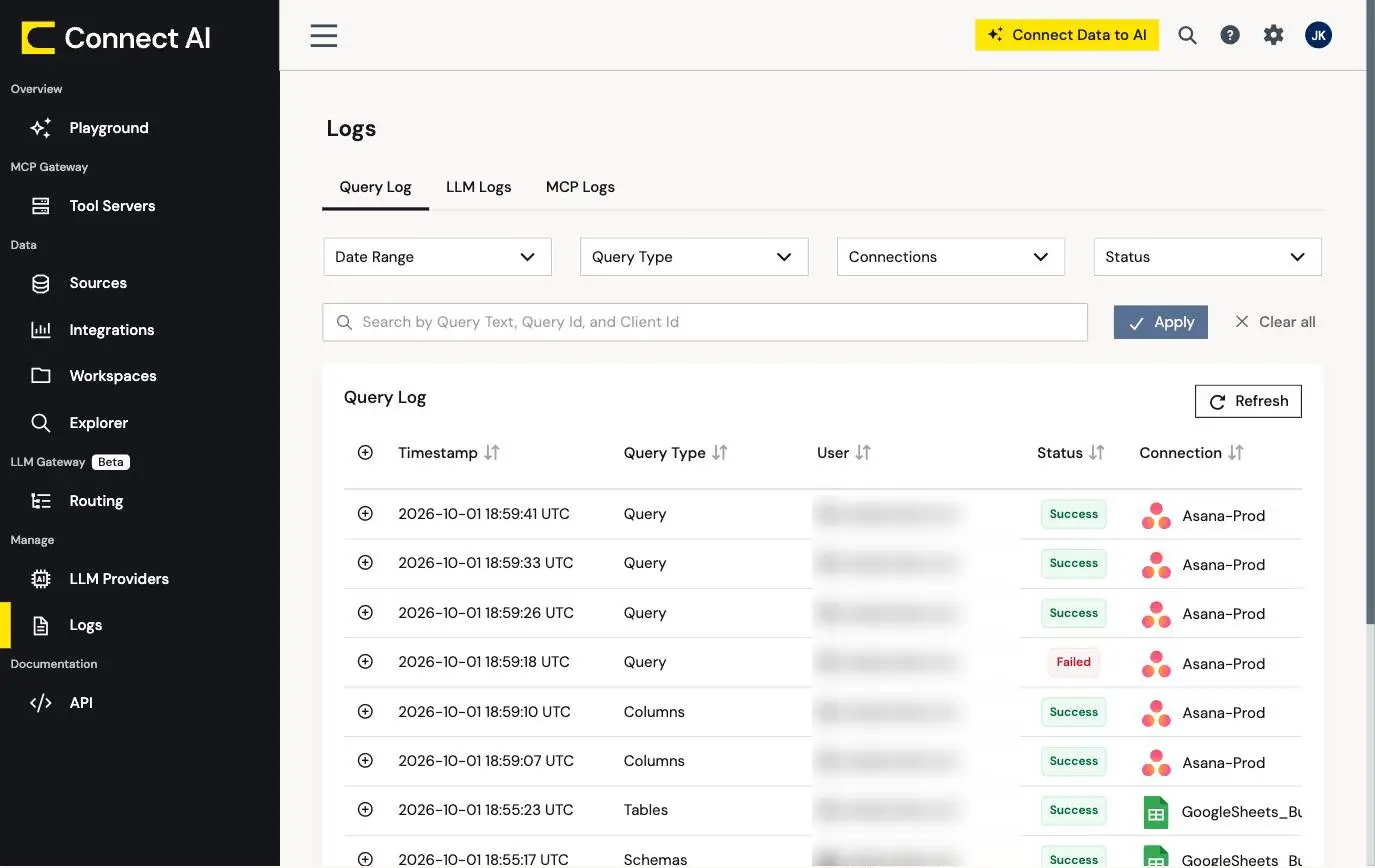
A query log. Every query records who ran it, against which connection, and the exact command, and the log can be exported to a security information and event management (SIEM) tool such as Splunk or Datadog (CData governance).
Certifications. SOC 2 Type II and ISO/IEC 27001:2022 (CData security).
In the dots test, the query log showed the dot’s whole sequence for the Asana write, including the exact command that created the task, within about 30 seconds.
Answers that cross systems
Many business questions span systems: pipeline in Salesforce against bookings in NetSuite, or accounts with open Zendesk escalations that renew this quarter. Connect AI’s Virtual Data Layer can join live data across them at the source (CData). Connect AI covers hundreds of sources, including on-premises databases and ERP systems, so the same connection keeps working when a question pulls in another system.
More accurate answers for fewer tokens
Connect AI does the heavy lifting on its side: it joins and filters across sources and hands the assistant the answer, rather than raw tables for the model to sort through. CData Labs tested what that changes. Across 378 prompts against CRM, project management, warehouse, and ERP systems, Connect AI answered 98.5% correctly, against 65–75% for other ways of exposing the same data to an agent (CData Labs). Errors compound on multi-source questions: at 75% accuracy per step, fewer than a quarter of five-step workflows finish correctly. In a separate test, one multi-source question took 4,427 tokens and one tool call through Connect AI, against 183,541 tokens and 22 tool calls with raw table access (CData Labs). Both are CData’s internal tests on sandbox accounts, and the test harnesses and raw results are public, so you can rerun them on your own setup (CData Labs).
Works the same in ChatGPT, dots, and Muse
The same Connect AI account worked as a ChatGPT plugin, inside a dot, and as a Muse custom connector, and neither assistant needed code. In ChatGPT, you install the plugin from the directory and sign in. In Muse, you ask for a custom connector in chat and paste a personal access token. If your team adds or switches assistants, nobody has to rebuild connections or re-approve access. Connect AI has published plans and a free trial (CData pricing).
When Connect AI isn’t the pick
If a built-in connector, a single vendor’s server, or a warehouse with data fresh enough for the question covers the job, use it. An automation platform fits better for triggering actions across a long tail of SaaS apps, and a small business on free Muse that only uses the built-in apps doesn’t need a gateway.
Connect your business systems to ChatGPT and Muse
Most teams start with built-in connectors and a vendor server or two, and those handle single apps well. When a team’s questions cross Salesforce, Jira, NetSuite, and the rest, and IT wants the same permissions and query log in ChatGPT, dots, and Muse, CData Connect AI gives you one connection to hundreds of systems. Start a free trial and connect your first source in minutes.
Frequently asked questions
What are the best MCP servers for ChatGPT?
It depends on the job: built-in plugins for common tools, a vendor’s own server for one app, Zapier or Workato for actions across SaaS apps, and CData Connect AI for secure, governed access across several business systems.
Does ChatGPT support MCP servers?
Yes. ChatGPT connects to MCP servers as plugins, either from its public plugin directory or, where an admin allows it, as custom plugins built on a remote MCP server (OpenAI). In Enterprise workspaces, creating custom MCP plugins is off by default and controlled by admins.
Can ChatGPT dots use MCP servers?
Yes, through plugins. A dot uses the plugins installed and enabled on your ChatGPT account, with the permissions you’ve set (OpenAI). In my October 2026 test, a dot used the CData Connect AI plugin from the public directory immediately after installation.
Does Meta Muse support MCP servers?
Yes, through custom connectors, which you create by asking Muse in chat. They can point at a remote MCP server such as Connect AI (CData KB). Meta doesn’t review custom connectors, so choose servers with their own permission controls (Meta Help Center).
Does Meta Muse have admin controls for business use?
Not that Meta has published as of October 20, 2026. Meta announced an enterprise platform that includes Muse on September 28, 2026, without dates or admin features (CIO). Until then, set permissions in the servers Muse connects to.
Which ChatGPT plan do I need for dots and MCP servers?
Dots are available on Pro and Business Premium, and as a beta on Enterprise once an admin turns it on (OpenAI). Pro dots aren’t available in the European Economic Area, the UK, or Switzerland. Plugins from the directory are available more widely than dots, and admins on business plans control which ones employees can use.
Are MCP servers safe for company data?
Yes, when the server applies the user’s own permissions, supports read-only access, and logs every request. Those controls belong to the server rather than the assistant, so the criteria above focus on them. Start read-only and review the log before allowing writes.
How many MCP servers should a business connect?
Only as many as cover the work. Each server adds a sign-in, a permission model, and a log to manage. Use built-ins first, add a vendor server for a single important app, and use one gateway for the rest rather than a server per system.





