The cost of enterprise AI scales with every query. Token overhead compounds across tool definitions, discovery chains, and multi-source round-trips. A single federated query against several enterprise systems can consume thousands of tokens before it returns an answer.
When that bill climbs, the instinct is to look at the model layer and reach for cheaper models, capped inference, or negotiated volume pricing. Those measures help. But the larger variable is rarely which model you run. It is how the agent’s tools are defined and how much context each call carries.
CData Connect AI handles enterprise AI at every level of determinism. While schemas are unknown, the Universal MCP tools let Claude discover connections, inspect data models, and reason across sources. Once workflows harden, the optimization features take over by scoping tool definitions, pre-joining data, and caching results so the same query runs at a fraction of the cost.
We benchmarked how much that architectural choice is worth. A federated prompt spanning Salesforce, Snowflake, and ServiceNow dropped 97.6% in token usage, from 183,541 tokens at $0.596 per query to 4,427 tokens at $0.027, across 56 independent runs on Claude Sonnet 4.6 at temperature=0.
To try the benchmark yourself, read the how-to guide in our Knowledge Base. Below we break down which Connect AI configurations drive that reduction and how to replicate them.
Why token usage is an enterprise cost driver
Per Anthropic’s documentation, a token is the atomic unit of text an LLM consumes and produces. A token in Claude is roughly three to four characters of text, or about three-quarters of a word. Every character in a system prompt, tool definition, query, and response counts toward the bill. Multi-source queries amplify this overhead at every layer.
Four factors inflate token cost per call.
Tool definition overhead. Each connected source adds its tool schema to the request. Anthropic’s engineering team measured a five-server MCP setup of 58 tools consuming around 55,000 tokens before a conversation begins. Their Tool Search feature reduced that footprint by up to 85% by deferring most tool loading.
Round-trip accumulation. Each tool call adds a tool_use block plus a tool_result block. By turn five of a multi-source discovery chain, the history has grown by tens of thousands of tokens, all re-sent on every subsequent turn.
Schema bloat. A default Salesforce Account search tool exposes more than 70 fields. Most queries need a handful. Unused fields still consume tokens on every call.
Discovery overhead on known workflows. An agent that doesn’t know what data exists has to inspect the catalog and retrieve schemas before it can query anything. On a recurring workflow against stable sources, that chain reruns every time and pays again for exploration that already happened.
The right architecture choice decides whether the bill grows linearly with adoption or stays manageable.
Where your workflow sits on the autonomy spectrum determines your architecture
Enterprise AI scales most efficiently when the architecture matches how settled a workflow already is. Exploratory architecture earns its cost on genuinely open questions, and a stabilized workflow rewards a tighter configuration.
AI agent workflows are not all the same, but they all fall along a spectrum of autonomy. Some sit at the exploratory, non-deterministic end, where token overhead is worth paying for the flexibility it buys. The features benchmarked in this article serve the deterministic end, where the pattern is established, the sources are known, and the same query runs on a schedule.
Those workflows generally run repeatedly with little or no human involvement, which makes token conservation more important still. We covered the full spectrum in The Autonomy Spectrum: What Agents Need at Every Level.
Three workflow types sit along that spectrum, and they map directly to the benchmark results below.
Fully exploratory. The question space is unbounded and the agent needs broad visibility, as with conversational assistants, ad-hoc analysis, or evaluating a source for the first time. Discovery overhead here buys real capability.
Semi-deterministic. The sources are known and the query pattern has largely settled, but the workflow still shifts occasionally and the agent still has judgment to exercise.
Fully deterministic. The sources, the fields, and the query shape are all fixed. Nothing is left to discover.
Every optimization in this article performs the same underlying move, which is to encode what is already known so the agent does not have to re-derive it. Pre-join the data. Scope the catalog. Cache what does not need to be live.
Define a parameterized tool instead of handing Claude a 70-column schema and letting it work out which six columns it needs. These decisions sit upstream of the model entirely.
The benchmark scenario
The test query mirrors a realistic enterprise prompt. It reads, “Show me open support tickets, the related Salesforce accounts, and the product telemetry data from Snowflake for enterprise customers. Return up to 50 rows.”
This is a fully exploratory, federated query spanning three independent enterprise systems in a single agent turn, covering an ITSM tool, a CRM, and a data warehouse. Token counts are read straight off the Anthropic Messages API response usage object, per call, per turn.
Parameter | Value |
Data sources | Salesforce (CRM), Snowflake (warehouse), ServiceNow (ITSM) |
Connected via | CData Connect AI managed MCP |
CData MCP Tools | getInstructions, getCatalogs, getSchemas, getTables, getColumns, getProcedures, getProcedureParameters, queryData, executeProcedure, execute_insert, execute_update (11 universal tools)
|
Model | claude-sonnet-4-6 |
Pricing reference | $3.00 / MTok input, $15.00 / MTok output (Anthropic list price) |
Token measurement | Captured from usage.input_tokens and usage.output_tokens on the Anthropic Messages API response, per call, per turn |
Run methodology | Real multi-turn execution against live MCP, where Claude plans, executes tool calls, ingests results, and repeats until end_turn |
Run counts | 4 to 16 independent runs per scenario at temperature=0 |
Aggregation | Median for high-variance scenarios (Raw baseline, Derived Views), mean for deterministic scenarios |
The diagram below contrasts the two paths. The baseline routes Claude through a discovery chain, running getCatalogs to getInstructions to getSchemas to getTables to getColumns, then three separate queryData calls before a final synthesis turn. This universal tool path is fully exploratory, appropriate for unknown schemas, and deliberately open-ended.
The optimized path collapses everything into a single Custom Tool invocation with no discovery overhead, which is the right architecture once the workflow has stabilized.
For semi-deterministic workflows that recur but still shift, Workspaces and Derived Views offer a middle path. They scope what Claude sees and pre-join sources without locking the workflow into a fixed pattern.
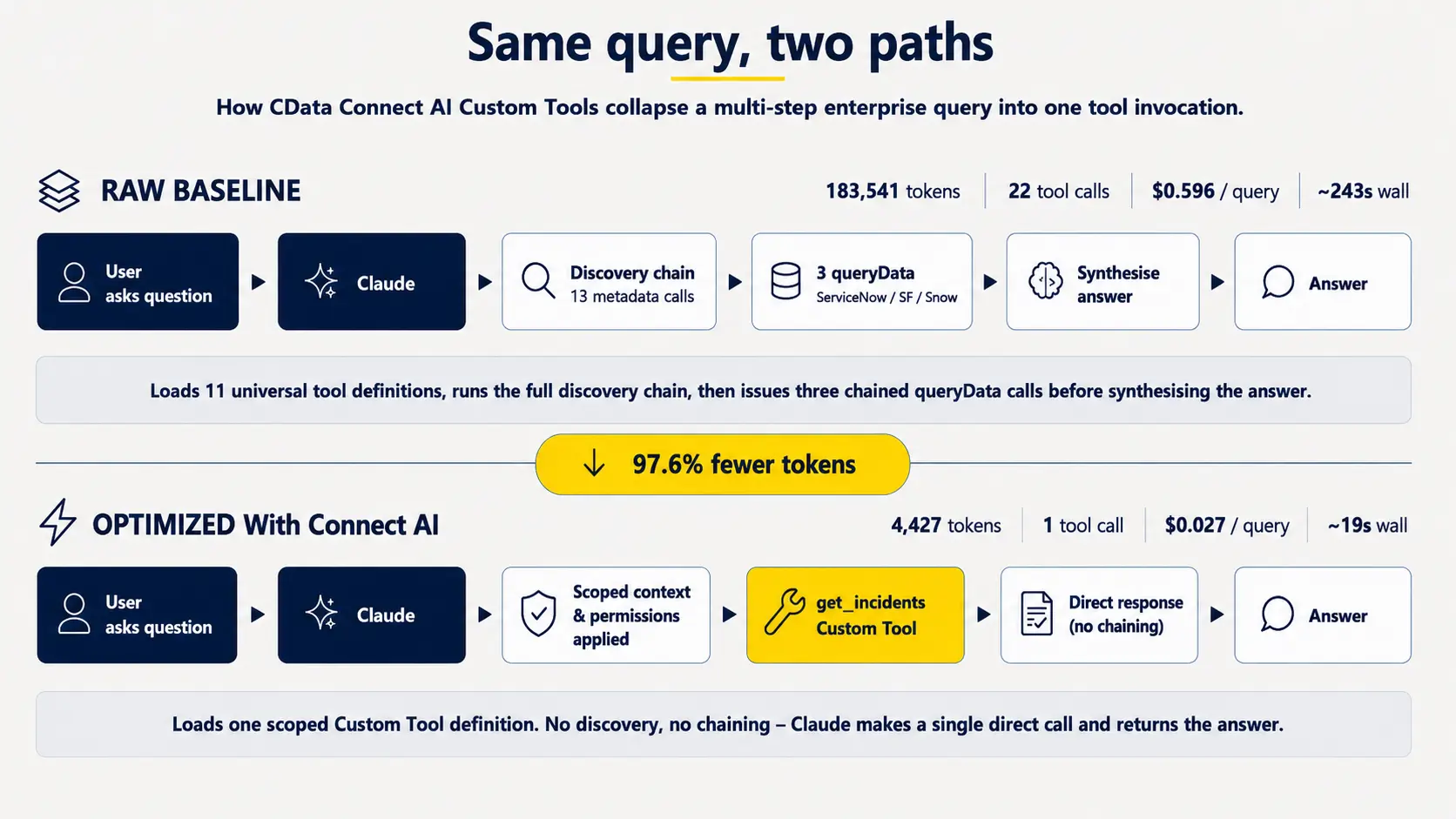
Token flow comparison, raw baseline versus optimized path
Up to 97.6% token reduction using Connect AI features
Each Connect AI feature was measured independently against the same fully exploratory baseline, the universal tool path, which took 22 tool calls to return an answer. That comparison shows what becomes possible as a workflow moves toward the deterministic end of the spectrum.
The table below reads as a spectrum. Each row matches an intervention to the workflow type it suits and measures the reduction against that baseline.
Configuration | CData Feature | Workflow type | Tokens | Cost / query | Reduction |
Baseline | 11 Universal Tools | Fully exploratory | 183,541 | $0.596 | — |
Pre-joined virtual views | Derived Views | Semi-deterministic | 40,983 | $0.146 | 77.7% |
Cached data | Jobs / Caching | Semi-deterministic | 19,778 | $0.075 | 89.2% |
Curated tool bundles | Toolkits | Semi-deterministic | 16,384 | $0.063 | 91.1% |
Optimal | All features combined | Semi-deterministic | 11,791 | $0.049 | 93.6% |
Scoped data catalogues | Workspaces | Fully deterministic | 11,713 | $0.049 | 93.6% |
Scoped custom toolkits | Custom Tools | Fully deterministic | 4,427 | $0.027 | 97.6% |
The baseline is the universal, unscoped path. Claude traverses the catalog, retrieves schemas, enumerates columns, queries, then synthesizes. At 183,541 tokens and $0.596 per query it is thorough and expensive, and it is the right architecture when the workflow is genuinely unknown.
Optimal is where most production workflows belong. It combines a scoped Workspace, pre-joined Derived Views, and cached results, which changes what Claude does on every call.
It sees only the relevant sources.
It does not re-orchestrate joins it has already run.
It reads from a fresh cache instead of hitting live systems.
That is 93.6% off the baseline, with enough flexibility left for a workflow that still shifts occasionally. The agent still earns its keep by reasoning across sources, handling edge cases outside a fixed template, and deciding what “enterprise customers” or “open tickets” means when the definition varies by system.
Custom Tools go further still for fully fixed workflows, reaching 97.6%. Beyond that point the calculation shifts. A workflow with no variation left may be served just as well by a stored procedure as by an agent task, so it is worth asking what the token spend buys that a fixed script would deliver.
What this means for your organization
Custom Tools cut tokens by 97.6%. A scoped tool definition cuts per-query cost and keeps spend predictable as workloads scale.
Workspaces, Toolkits, Caching, and the Optimal stack each deliver 89–94% reductions. Pick the feature that matches your workflow, since the cost outcome is similar.
Derived Views land at 77.7%. Pre-joining cross-source data eliminates orchestration work for every agent that runs the same query.
Per-query cost drops from $0.596 to $0.027, which removes about $57,000 in monthly token spend at 100,000 queries.
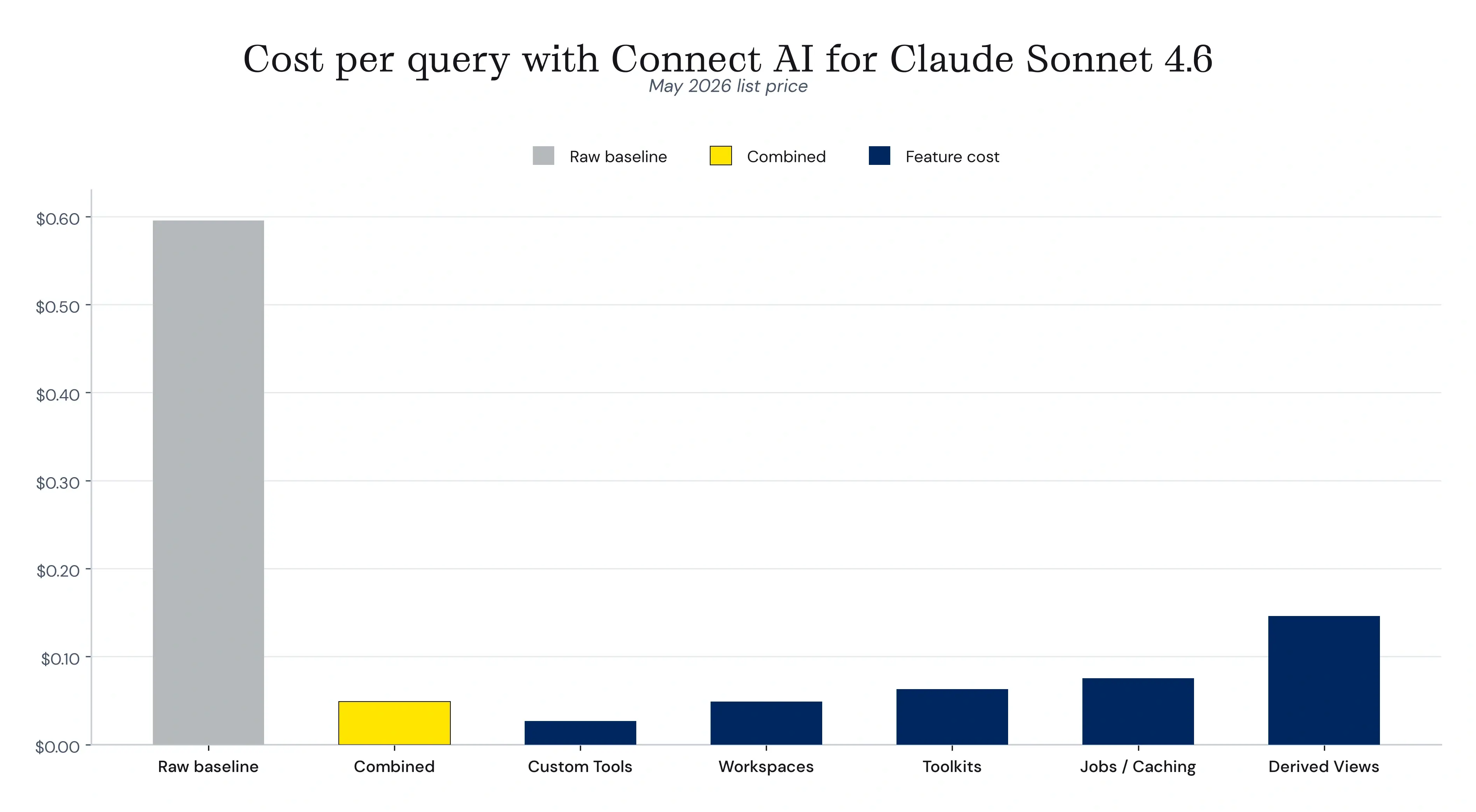
Estimated cost per query in USD per feature
Two further multipliers compound on top of these results.
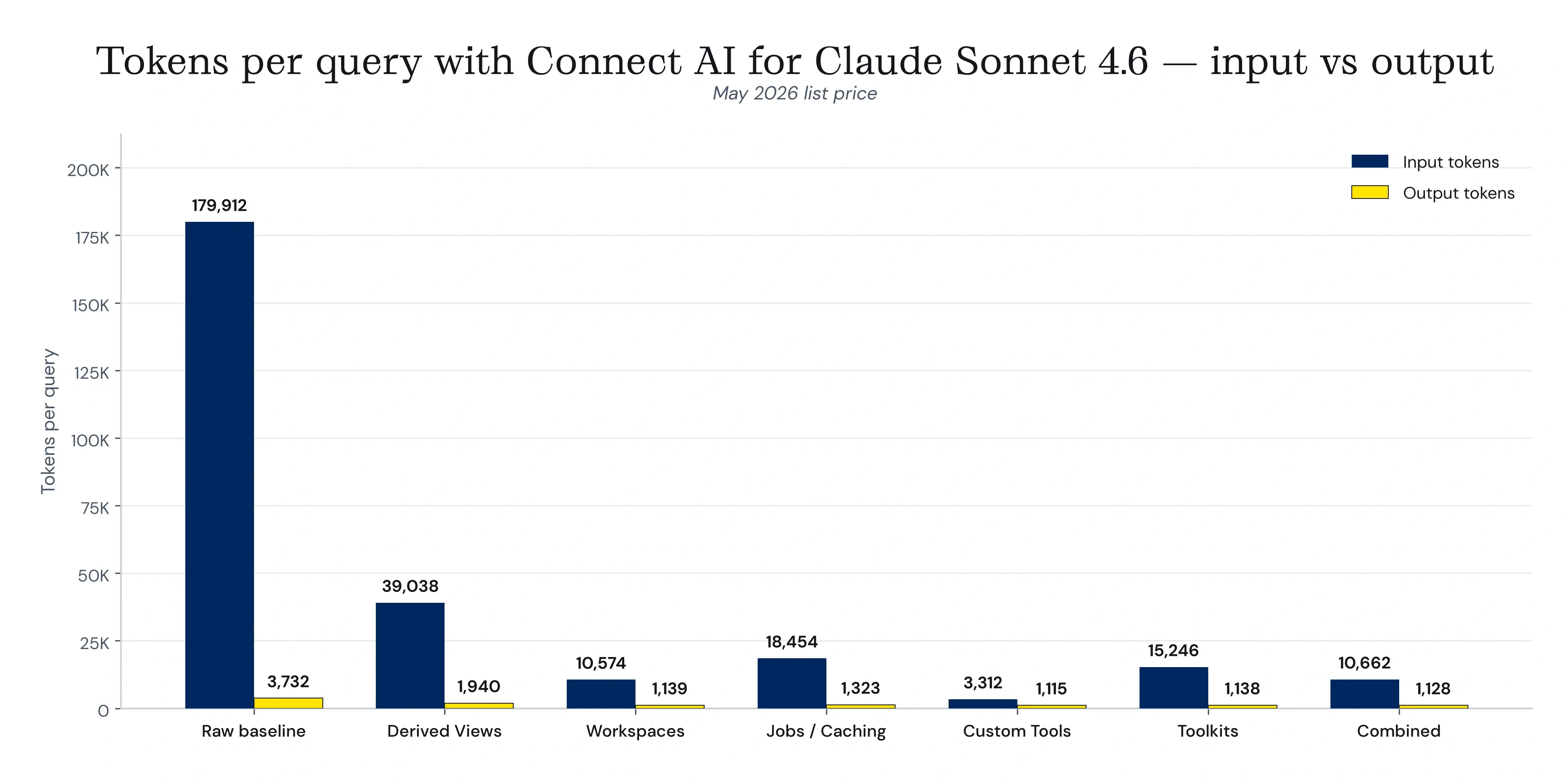
Total tokens per query, raw baseline versus each Connect AI feature
How each Connect AI feature reduces the tokens
Each feature removes a specific category of overhead before the request reaches Claude. The mechanics differ, but the underlying lever is the same. Once the workflow is known, configure it once and deploy Claude faster. These features are designed for workflows that have moved past the exploratory phase and now run on a defined, repeatable pattern.
Derived Views pre-join multi-source data
Derived Views are reusable virtual tables defined with a curated SQL statement. They encapsulate joins, filters, and transformations across one or more sources so the AI only sees the finished result. The benchmark view pre-joins ServiceNow incidents with Salesforce accounts and Snowflake telemetry.
The benchmark measured 40,983 tokens as a median of 16 runs, a 77.7% reduction. Three source schemas collapse into one and the multi-call orchestration disappears. Wall-clock drops from 242.8s to roughly 50s per query. This configuration suits semi-deterministic workflows.
Workspaces scope the data catalog Claude sees
Workspaces act as a data catalog inside Connect AI. They organize tables, views, and Derived Views into named groups and generate dedicated endpoints for REST, OData, and OpenAPI, so each AI agent sees only the assets the workspace owner published. The benchmark workspace exposes three relevant Custom Tools and nothing else.
The benchmark measured 11,713 tokens as a mean of 6 runs at 0.1% variance, a 93.6% reduction. Scoping the tool list also keeps Claude focused on the published assets, a governance win alongside the cost win. This configuration suits fully deterministic workflows.
Jobs and Caching pre-fetch and reuse results
Connect AI Jobs let admins select tables to cache to a managed PostgreSQL store on a recurring schedule. Once cached, queries hit the local copy instead of the live source, so Claude gets fast responses without paying the discovery and live-fetch round-trip.
The benchmark measured 19,778 tokens as a mean of 4 runs at 0.0% variance, an 89.2% reduction. This is the best fit for high-frequency recurring queries where hourly or daily freshness is acceptable. It suits semi-deterministic workflows.
Custom Tools expose only the schema Claude needs
Custom SQL Tools are admin-defined parameterized SQL templates inside a Toolkit. Each one exposes a precisely scoped query, covering only the fields, filters, and parameters the workflow needs, as a named tool the AI can call directly. The benchmark Custom Tool replaces the default 73-column Salesforce Account schema with a six-column scoped definition.
The benchmark measured 4,427 tokens as a mean of 6 runs at 0.8% variance, a 97.6% reduction and the strongest single-feature optimization in the set. Wall-clock falls to 19s per query. One tool call returns right-shaped data, and the answer follows. This configuration suits fully deterministic workflows.
The reliability gain matters as much as the cost. LLMs are not databases, and relevant information competes with irrelevant information across the context window in a ratio that affects the output.
A definition scoped to the six fields a workflow actually reads keeps Claude reasoning over exactly the data the answer requires. In the benchmark, the scoped path was correct on the first attempt across every run.
Toolkits bundle curated tools per workflow
Toolkits bundle Custom Tools and connection tools into a named container with its own MCP endpoint. Where Workspaces scope at the data catalog level, Toolkits scope at the workflow level, so a sales toolkit, a finance toolkit, and a support toolkit each stand on their own.
The benchmark measured 16,384 tokens as a mean of 6 runs at 0.0% variance, a 91.1% reduction. The benchmark Toolkit bundles three source connections and three Custom Tools into 16 tools total, and Claude consistently picks the named Custom Tools over universal discovery tools. This configuration suits semi-deterministic workflows.
Optimal is the recommended production stack
The Optimal configuration layers a scoped Workspace, pre-joined Derived Views, and scheduled Jobs into a single path. Each element removes a different category of overhead, namely the catalog Claude has to search, the joins it would otherwise orchestrate, and the live round-trip it would otherwise pay for.
The benchmark measured 11,791 tokens, a 93.6% reduction. This configuration suits semi-deterministic workflows and is the default we recommend for production workloads that have stabilized but still need room to move.
How to replicate this in your enterprise AI workflows
The right starting point depends on where your workflow sits on the autonomy spectrum. If you are still in the exploratory phase, evaluating data sources, prototyping queries, or handling ad-hoc analysis, the universal tool path is appropriate. Let Claude discover, reason, and iterate. The token overhead is the cost of genuine flexibility.
Before configuring anything, measure two numbers. First, pull the tool definitions your workflows are calling and compare fields exposed against fields actually used, because that gap is the most direct measure of avoidable cost.
Second, count the tool calls a typical run needs before data comes back. The benchmark’s exploratory baseline took 22. The Custom Tool path took one. Those two numbers tell you which of the steps below will pay off fastest.
Once a workflow has stabilized into a repeatable pattern, the features below layer naturally. The fastest path from exploratory to production-ready runs in five steps.
Start with Workspaces. Scope the data catalog to what each Claude session actually needs, so you expose three tools instead of three hundred.
Apply Custom Tools to high-use connectors. Trim each schema to the fields the workflow reads. The Salesforce Account example shrinks the tool definition by roughly 80%.
Build Derived Views for recurring multi-source joins. Pre-join server-side instead of asking Claude to orchestrate three calls every time.
Schedule Jobs for non-real-time data. Any query where hourly freshness is acceptable belongs in the cache.
Group these into Toolkits per workflow. Sales, finance, and support each get their own named Toolkit with a dedicated MCP endpoint, so each Claude session only connects to the tools it needs.
The benchmark numbers above show what is available when the data layer is configured to support it. Scoped catalogs, pre-joined views, cached results, and parameterized tools do not just reduce token costs. They make enterprise AI predictable enough to scale. For organizations running AI at volume, the right data layer is where token efficiency and cost control are actually won.
Frequently asked questions
What causes high token usage when Claude queries enterprise data?
Three drivers dominate: tool definition lists for many connected sources, multi-step chains of sequential discovery and queries, and verbose raw API responses on each tool result. Architectural choices matter more than prompt wording.
Does token optimization affect the quality of Claude’s answers?
When applied well, it improves answer quality by reducing noise. Scoped tool lists and pre-joined Derived Views give Claude less irrelevant information to reason over. LLMs are not databases: relevant information competes with irrelevant information across the context window in a ratio that affects the output. In the benchmark, the scoped Custom Tool path was correct on the first attempt across every run.
How do I measure token usage in my current Claude setup?
Use the Anthropic token counting endpoint at POST /v1/messages/count_tokens to size requests before sending them. Output tokens are reported in the usage field of every response.
Which Connect AI feature delivers the largest saving?
Custom Tools produced the largest single-feature reduction at 97.6%, though the right answer depends on the workflow. Teams with many connected sources gain most from Workspaces and Toolkits, frequent cross-source joins from Derived Views, and stable repeat workflows from Caching.
When should I keep using universal tools instead of optimizing?
Universal tools are the right choice when workflows are genuinely exploratory: schema discovery, ad-hoc analysis, prototyping, or any task where the query shape is not known in advance. The optimization features in this benchmark are designed for workflows that have stabilized into repeatable patterns. If the pattern is not fixed yet, let Claude explore freely and optimize once it is. For more, see The Autonomy Spectrum: What Agents Need at Every Level.
Do these patterns apply to other LLMs?
The architectural principles apply to any token-priced LLM. Connect AI’s MCP design means the same features work with any MCP-compatible client, including Claude, Microsoft Copilot, Cursor, and n8n.
Token reduction at every query with CData Connect AI
Architecture decides whether enterprise AI scales economically, and the right architecture depends on the workflow. CData Connect AI compresses multi-source integration into a single governed MCP endpoint with hundreds of connectors, identity-first security, and every feature above, configured once and reused across each Claude workflow.
Start a free trial to run the same benchmark against your enterprise data.





