There is a push amongst SaaS vendors right now to funnel as much AI activity through their platform interfaces as possible. It makes sense for the vendor, but not for your business. The AI market is simply moving too fast to lock your AI activity into single points of failure, and that’s why our latest release of Connect AI is designed to encourage use across the tech stack and AI tools you already use.
The August Connect AI release adds new capabilities to help teams expand Connect AI’s benefits through these very systems. A new Management API brings off-platform programmatic administration to user lifecycles, roles, workspaces, connections, and Personal Access Tokens (PATs). SIEM integration streams Connect AI's audit events into the security tooling that teams already monitors. And File Transfer and custom instructions extend what agents can be called to do via Claude, ChatGPT, or any other AI tooling, inside Connect AI's governed MCP layer, without losing any of the controls around it.
The August release: running Connect AI as AI infrastructure
To extend control within Connect AI, the Management API lets administrators manage the user lifecycle, assign roles to SCIM-synced groups and individual users, govern workspaces and connections, and manage PATs organization-wide, all without leaving the systems you use today. Plus, SIEM integration builds on Connect AI's existing immutable, searchable audit log by pushing those events straight into Datadog or Splunk HEC.
To enhance connectivity, File Transfer closes a gap at the MCP protocol layer, where agents can now move files to and from connected systems, including Jira, Salesforce, SharePoint, Box, and more, over short-lived, pre-signed blob storage URLs. Binary content moves directly between the client and storage rather than through the MCP channel or the model's context.
To give agent’s more specific context, custom instructions add a user-authoring layer on top of Connect AI's get_instructions MCP tool. Admins set freeform AI instructions at the connection and workspace level, merged automatically with CData's base source instructions at query time, so agents and AI tools follow your organization's own conventions without any additional per-connector engineering needed.
A deeper dive into each new capability
Administer Connect AI programmatically with the Management API
Identity providers already trigger access events automatically through process already built out by security and IT teams. But, until the Management API for Connect AI, every administration task, from adding a user to issuing permissions, happened through the UI by hand.
The Management API for Connect AI now offers another path, so Enterprise teams can script, automate, and fold Connect AI administration into their own tooling and CI/CD pipelines instead of clicking through the console by hand for each task. This release covers user lifecycle management, PAT management, discovery of SCIM-synced groups, role assignment to groups and individual users, visibility into how access is granted, and programmatic governance of workspaces and connections.
Consider a financial services firm running Connect AI across a dozen internal teams. Today, onboarding a new analyst means someone on IT logging in manually to add the user, assign roles, and issue a PAT. With the Management API, IT builds a lightweight provisioning script instead, so when a new employee shows up in the identity provider, the script creates the user in Connect AI, assigns the right SCIM-synced groups and roles, and issues a PAT with a 90-day expiry. No UI, no IT ticket, no lag.
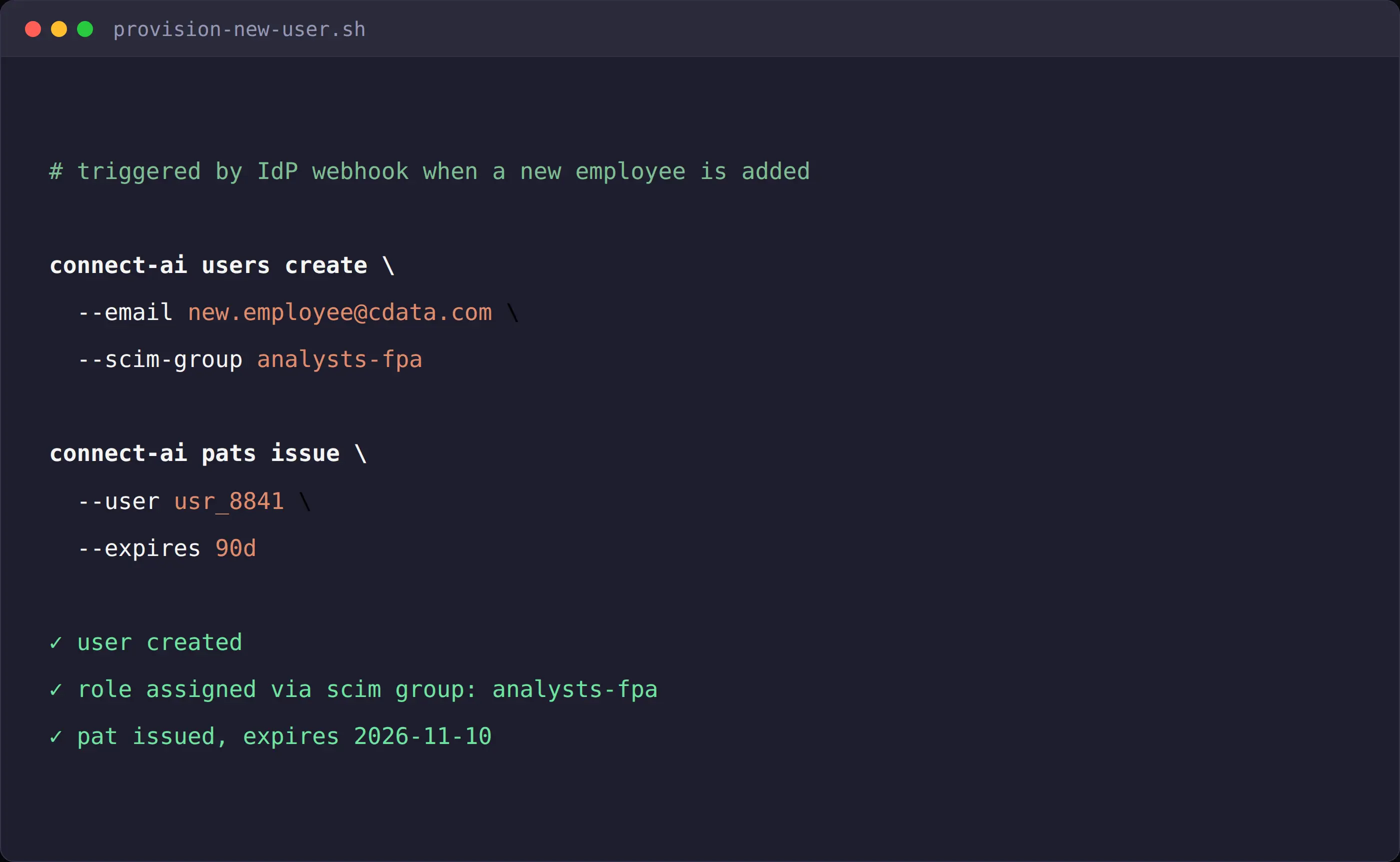
[Management API in use]
Stream audit events into the SIEM your security team already watches
Connect AI keeps an immutable, searchable record of every user login, permission changes, and every other audit event. While that record store is important, those events are invisible to the correlation rules that enterprises are running across the rest of their entire security stack.
Now those events don't have to stay in Connect AI's own store. Configure a webhook endpoint and Connect AI streams audit events to Datadog or Splunk HEC, alongside everything else the security team already monitors and protects. Additional providers are on the roadmap.
With a webhook endpoint configured for the account, Connect AI events now stream in alongside everything else, so a permission change or an unusual update on a sensitive connection triggers the same alerting and correlation rules as any other system in the stack. For security teams that measure mean time to detect (MTTD) for anomalous access events, this means that their correlation rules that already trigger on suspicious patterns can be applied automatically with no custom export job or separate monitoring process spun up
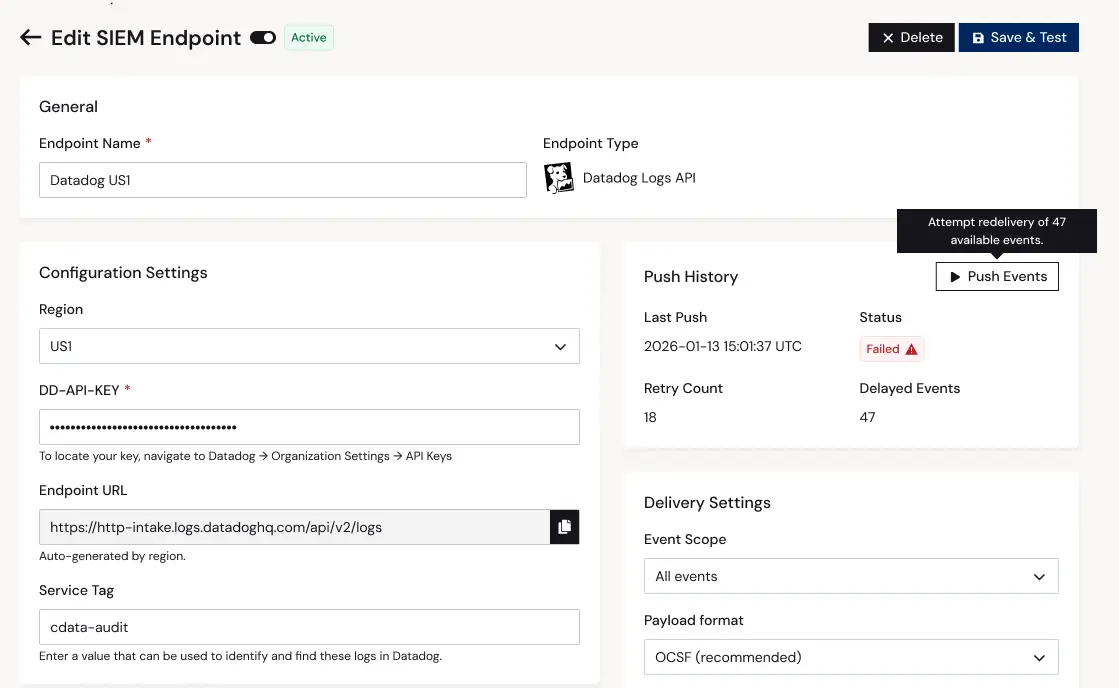
[SIEM webhook configuration]
Move files across connected systems without leaving the agent session
Most AI Agents today can query data, generate summaries, and draft outputs, then it stops and a human must close the loop by attaching a document to a record or routing it to a specific team. Agentic workflows are only as autonomous as their weakness handoff, and if agents can’t complete file-centric tasks end-to-end, that creates a bottleneck for every workflow that needs to prove the ROI case for automation.
File Transfer with Connect AI's MCP server can now be prompted to move files between enterprise systems and AI tools in both directions. Agents attach a document to a record, retrieve an existing attachment, or do both in the same session, across the connector catalog including Jira, Salesforce, SharePoint, Box, and many more. The MCP server issues a short-lived, single-use pre-signed URL (a 15-minute window by default); the client performs a direct HTTP transfer, so the content moves straight to blob storage instead of passing through the MCP channel or the model's context.
Imagine a support agent handling a signed contract that a customer just emailed into the sales inbox. It is prompted to attach the email to the matching account record from the CRM and summarize with an existing attachment already on file. Before File Transfer, neither step could happen over MCP naturally. In the past, someone had to finish the attachment work by hand in the source system’s UI. Now the agent downloads the existing attachment through a pre-signed GET URL, summarizes it, and uploads the new contract through a pre-signed PUT URL, with the file bytes moving directly to and from blob storage the whole way through.
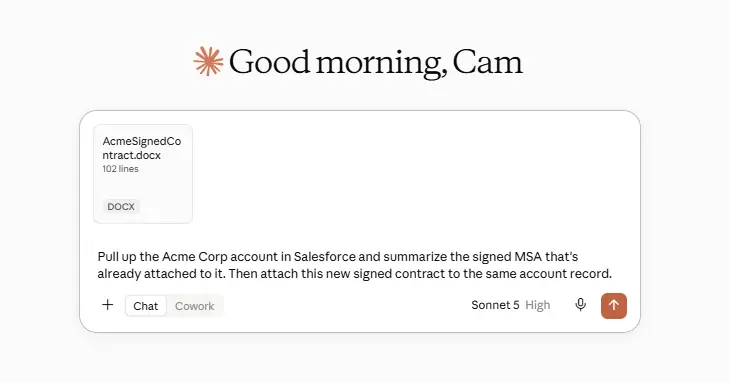
[AI attaching/retrieving a file via MCP]
Layer your own rules on top of Connect AI's base instructions
Connect AI already tells an AI client how to work with each connected source through its get_instructions tool. These instructions cover the standard schema conventions, query patterns, and known objects, but they don’t cover the custom objects, external relationships, or team-specific query rules that your org follows.
Custom instructions now let teams add their own guidance on top of those prescribed instructions. Admins set freeform instructions on a connection or an entire workspace, covering naming conventions, business rules, custom objects, and preferred query patterns, and Connect AI merges them with its base source instructions every time an agent asks. This makes agents more accurate and saves on tokens over time.
Say an admin connects a Salesforce org that uses custom objects and field names specific to the company. Out of the box, an agent follows the base Salesforce instructions but has no way to know the local conventions. The admin opens the AI Instructions tab on that connection and writes a few lines describing the naming conventions and the fields analysts care about most. From then on, get_instructions returns the base Salesforce instructions with that custom guidance merged on top, so agents querying the connection follow the company's conventions automatically, with no connector changes and no edits to the platform's base instructions.
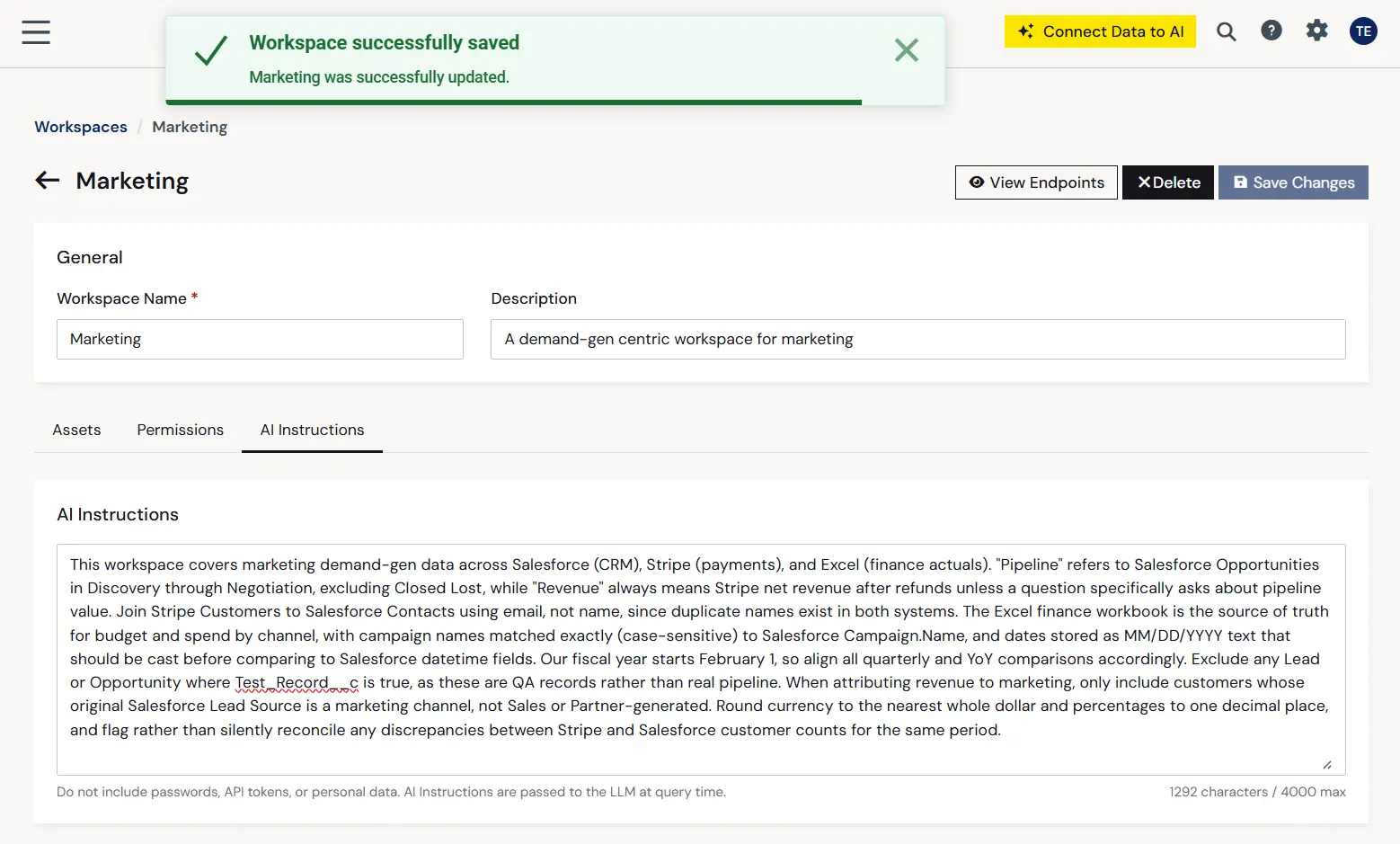
[AI Instructions editor tab]
Explore the August release
The August release is available now. To explore the new capabilities or see how Connect AI's governance and connectivity infrastructure fits your AI deployment, get started with a free Connect AI trial or contact our team.
Capability | Description | Advantage gained |
Management API | Programmatic administration covering user lifecycle, SCIM group discovery, role assignment, access visibility, and workspace/connection governance, plus organization-wide PAT management. | Time savings — Administer Connect AI through your own tooling and CI/CD pipelines that you already use in production: provisioning, roles, and tokens managed the same way as the rest of your infrastructure. |
SIEM integration | Configurable webhook delivery of audit events to Datadog and Splunk HEC, in OCSF format. | Confidence & consistency — Connect AI activity lands in the security stack your team already monitors, with no custom export job or separate console to watch. |
File transfer | Bidirectional file transfer over short-lived, pre-signed blob storage URLs, available across the connector catalog with no per-connector changes. | Efficiency — Upload and download files through MCP. Agents complete document-centric tasks (attach a file, read an existing one, or both) inside a single session, with content never entering the model's context. |
Custom instructions | Freeform AI instructions at the connection and workspace level, merged additively with CData's base source instructions at query time. | Company-specific accuracy — Agents follow your organization's naming conventions and business rules automatically, without editing connectors or forking Connect AI's base instructions. |
Additional resources





