Tableau Desktop is now free! With the launch of Tableau Desktop Free Edition, analysts and BI teams can dive into powerful visualizations without the barrier of licensing costs, and CData Connectors make it even easier, offering seamless live connectivity to hundreds of applications, databases, and data warehouses.
What makes CData Tableau Connectors particularly future-proof is what sits beneath the surface. Every connector has a built-in SQL-based queryengine, the same foundation that powers CData's AI-ready solutions. That means the connections and queries you build in Tableau Desktop today are compatible with Tableau Cloud, AI agents, MCP-enabled workflows, and data pipelines tomorrow.
This article covers the Tableau Desktop Free Edition offering, the full capabilities of CData Tableau Connectors, and how to set up the connectors within the Tableau interface.
Tableau Desktop Free Edition
Tableau Desktop Free Edition sits in the middle of Tableau's desktop lineup, offering a fully capable baseline for individual users and businesses.
What it includes: A fully functional Tableau Desktop experience. Connect to 350+ data sources through CData Tableau Connectors, run live queries with unlimited rows and no expiration, and build the same rich dashboards you would expect from a paid license.
Limitations: The Free Edition cannot publish to Tableau Cloud or Tableau Server, and packaged workbooks cannot be shared with other users. Published data sources on Tableau Cloud or Tableau Server are also not supported.
| Public | Free Edition | Professional |
Price | Free | Free | Paid |
Save locally | ✔ | ✔ | ✔ |
Auto-recovery | ✔ | ✔ | ✔ |
Live data refresh | Google Drive only | ✔ | ✔ |
Row limit | 15M rows | Unlimited | Unlimited |
Publish to Tableau Public | ✔ | ✗ | ✔ |
Publish to Tableau Cloud/Server | ✗ | ✗ | ✔ |
Share packaged workbooks | ✗ | ✗ | ✔ |
Data sources | Limited (Google Drive, Excel, JSON, PDF, OData, Text, Spatial, Statistical files) | Full connectivity: published data sources on Tableau Cloud or Tableau Server are not supported | All data sources supported |
A full comparison can be found here: Tableau Desktop Public Edition, Free Edition, and Professional Edition Feature Comparison.
CData Tableau Connectors
CData Tableau Connectors are certified, enterprise-ready solutions for getting live data into Tableau from 350+ sources, without the overhead of traditional data pipelines.
Key data source categories: Supports connectivity across Accounting, CRM, ERP, Marketing Automation, on-premises, and cloud data sources.
SQL support: The connectors use standard SQL-92, the language Tableau speaks natively, translating queries to retrieve real-time data from connected sources. This includes full support for filtering, GROUP BY, JOINs, and aggregations, even in Live Connection mode.
No-ETL approach: CData's live connectivity eliminates the need for traditional ETL processes and local data replication. Live querying keeps data fresh, reduces security risks, and removes the data staleness and inconsistency problems that come with replication-based approaches.
These connectors are Tableau-certified and available for both Windows and Mac, meaning teams can connect to data sources in minutes and start building dashboards immediately, with no coding, complex ETL, or IT overhead required.
Popular sources
CData Tableau Connectors bridge the gap for sources that Tableau does not natively support. Popular sources include GitHub, Dynamics 365, Dynamics 365 Business Central, Sage Intacct, QuickBooks, Workday, HubSpot, Zendesk, Microsoft Dataverse, Airtable, Azure DevOps, Odoo, Microsoft Entra ID, Confluence, and Slack.
These additional sources enable workflows such as:
Engineering teams can connect GitHub directly to Tableau to visualize repository activity, track pull request cycle times, and monitor code review bottlenecks, all from live version control data with no manual exports required.
Finance teams can pull live data from QuickBooks into Tableau to build real-time P&L dashboards, track cash flow trends, and monitor accounts receivable and payable in one place.
HR and people ops teams can connect directly to Workday to visualize headcount changes, track time-to-hire and attrition trends, and monitor workforce costs across departments, without replicating data or waiting on scheduled refreshes.
Connecting with Tableau
Connecting CData Tableau Connectors with Tableau Desktop Free Edition can be completed quickly with the following steps:
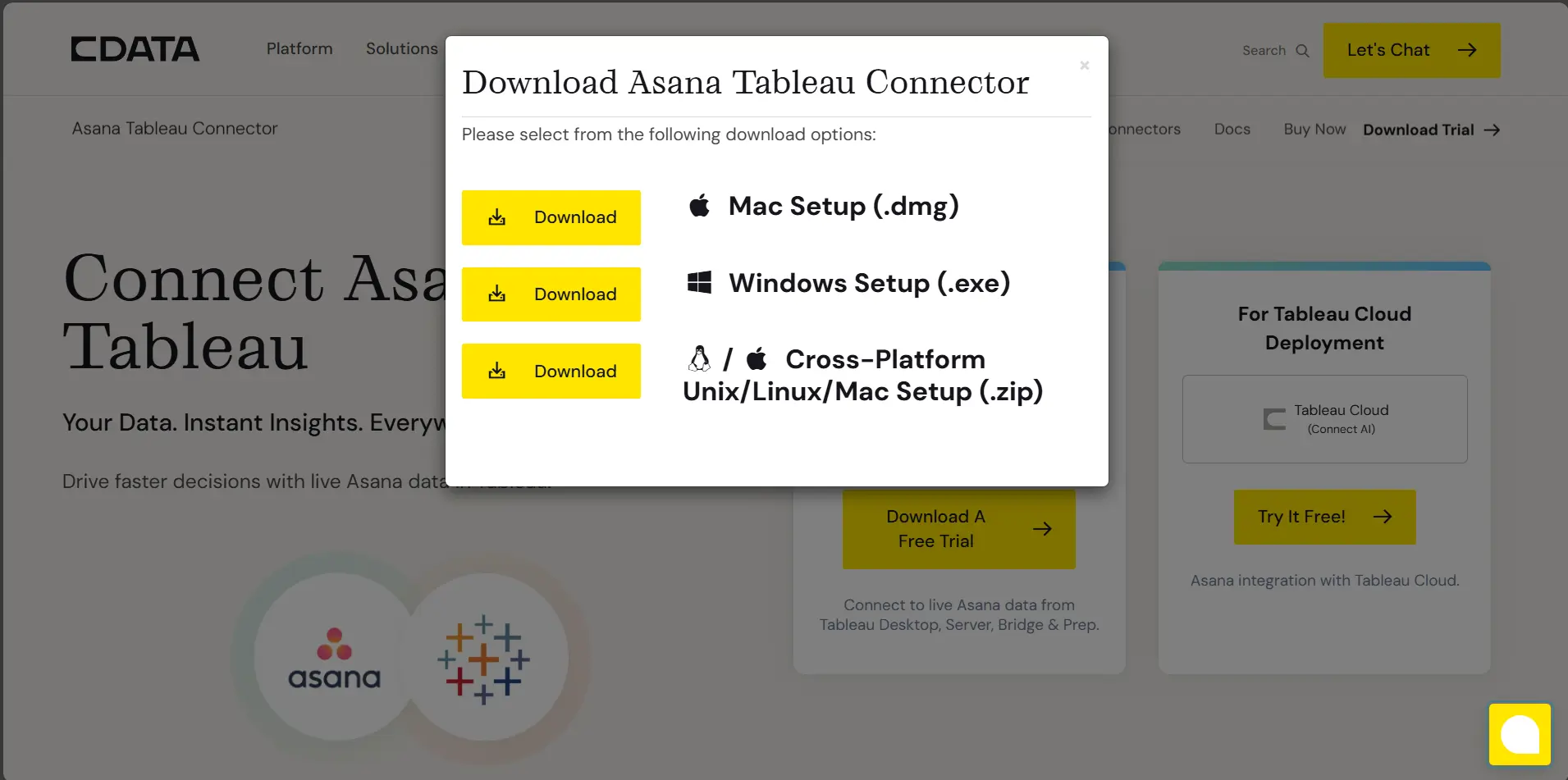
Step 1: Download and install the Connector for a data source:
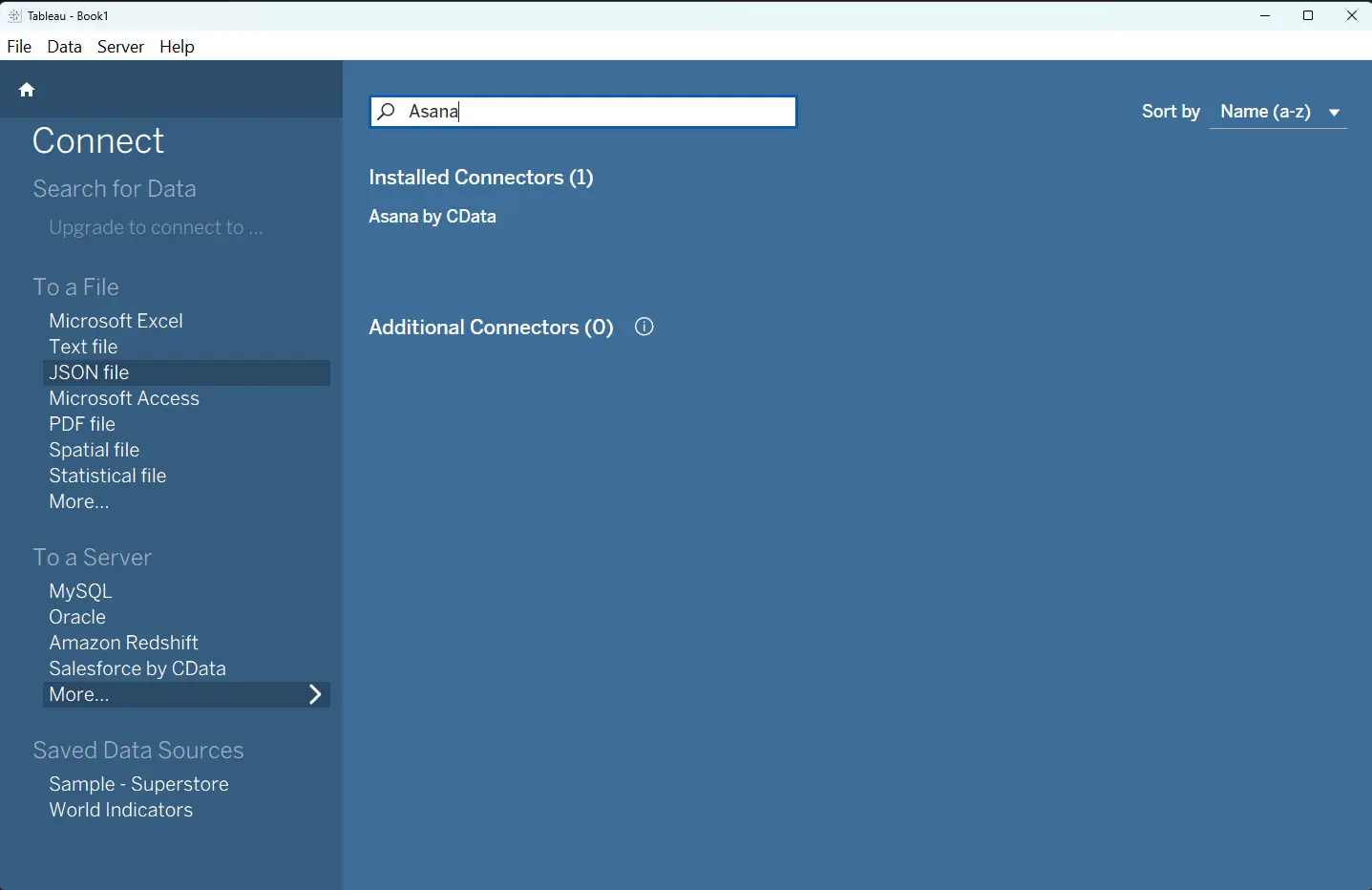
Step 2: Open the ‘Connect’ page in Tableau:
If you need to install Tableau, instructions can be found here: Get Tableau Desktop Free Edition.
Click ‘More…’ under the ‘To a Server’ section. Search for the Connector. The CData Tableau Connectors you installed will appear in the same way as native Tableau Connectors.
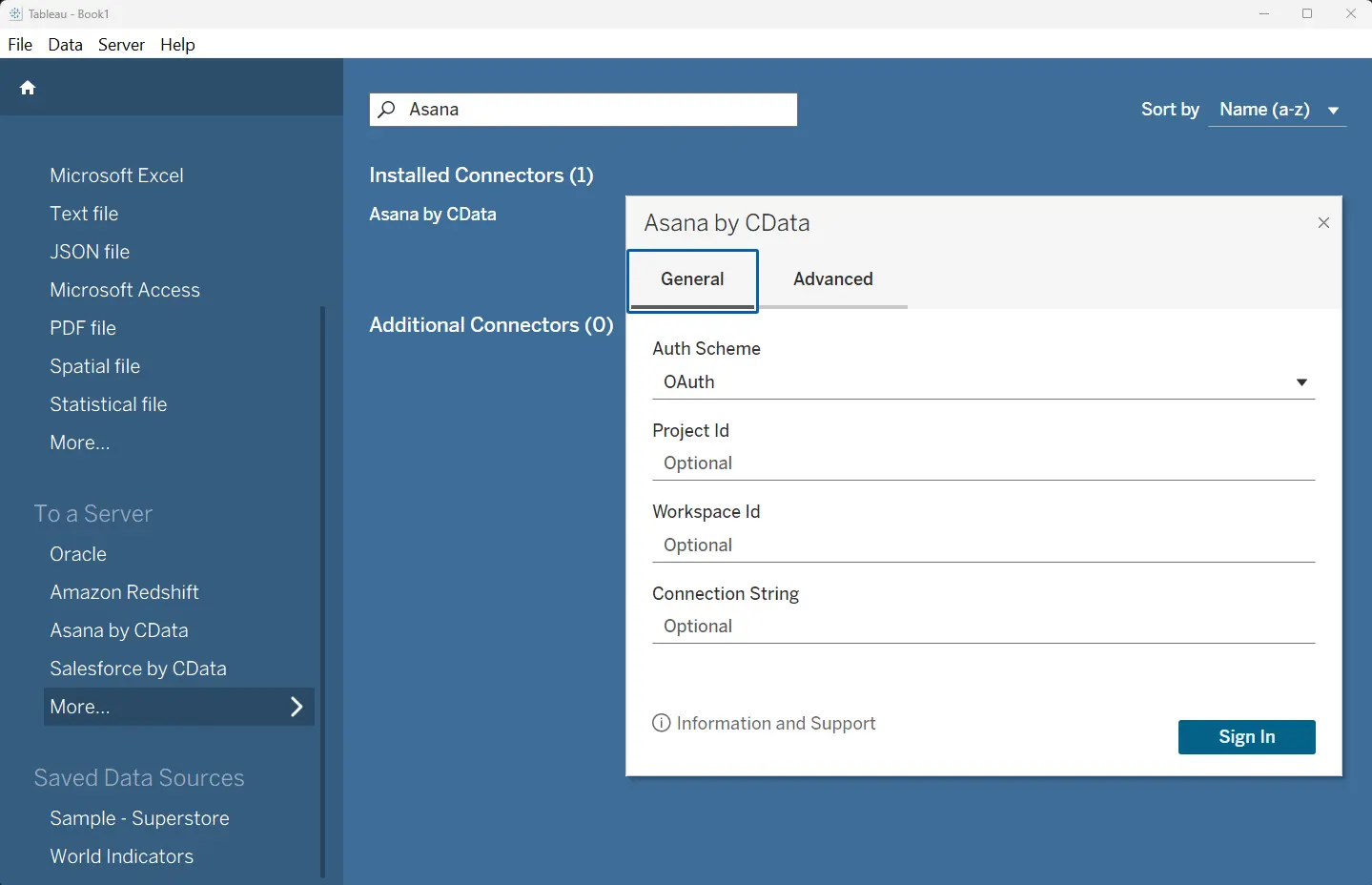
Step 3: Establish your source connection
Detailed connection guidance for each source is available here: CData Tableau Connectors | 350+ Data Sources.
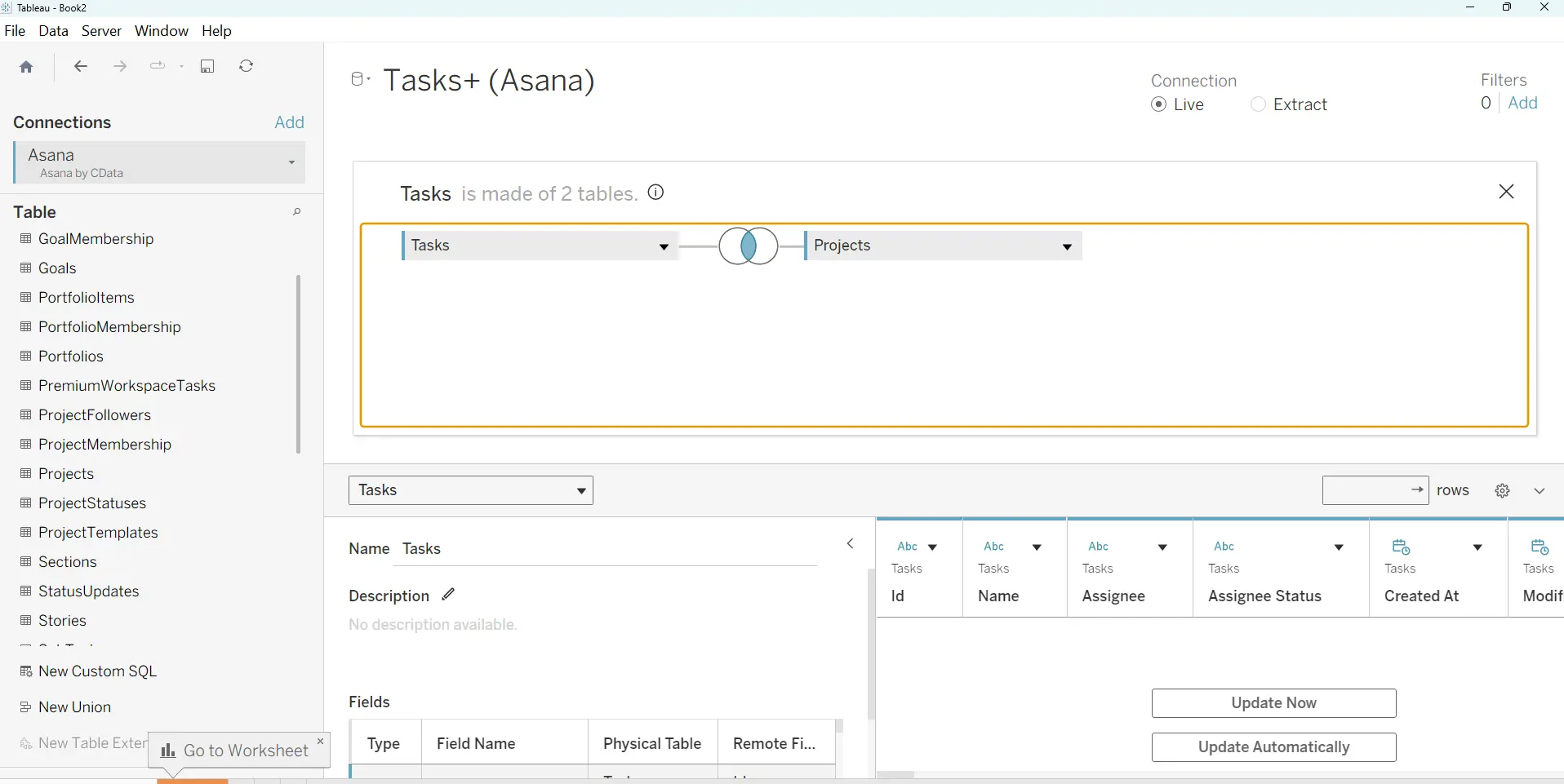
Step 4: Use your data within Tableau
Getting started with CData Tableau Connectors
The combination of Tableau Desktop Free Edition and CData Tableau Connectors makes real-time data visualization more accessible than ever. Every CData Tableau Connector shares the same underlying schema and query engine that powers CData's AI-ready solutions, from Tableau Cloud connectivity to MCP-enabled drivers for AI agents, to Connect AI for AI-native applications, to Sync for large-scale data pipeline infrastructure.
Get started by downloading Tableau Desktop Free Edition and exploring CData's full connector library.





