Replication is a mechanism that automatically propagates changes from a source database to a destination database, ensuring every system works with consistent and up-to-date information. SQL Server provides a robust, built-in replication engine that supports multiple topologies for distributing data across locations. Enterprises rely on it for high-availability systems, reporting offloads, disaster recovery, and geographic data distribution, making it an important component of any distributed data architecture.
This blog covers all four SQL Server replication types, how to configure each one, and how CData Sync delivers the same outcomes without the agent infrastructure, distribution databases, or custom T-SQL that native replication requires. While SQL Server can act as both a source and a destination, this blog focuses on SQL Server as a source. With CData Sync, the destination can be any of hundreds of targets, including Snowflake, Redshift, Azure Synapse, and BigQuery, removing the lock-in to SQL Server-only subscribers.
Key components and architecture
Every SQL Server replication topology uses three roles. The publisher is the source database that makes data available. The distributor is an intermediary that stores and forwards replicated changes. The subscriber is the destination that receives and applies those changes.
CData Sync maps directly onto this model: the SQL Server source is the publisher, the destination warehouse or database is the subscriber, and CData Sync itself replaces the distributor and all its agents. A publication groups articles (individual tables or views) for distribution, and a subscription links a publication to a subscriber. For example, a SalesOrders publication might contain Orders and OrderDetails articles that a reporting database subscribes to.
Four agents drive the native process. The Snapshot Agent creates the initial full copy snapshot that seeds subscribers; the Log Reader Agent captures committed transactions from the publisher log; the Distribution Agent moves those changes to each subscriber; and the Merge Agent synchronizes and resolves conflicts in merge scenarios. Each of these agents require independent configuration, monitoring, and maintenance. CData Sync replaces all four with a single scheduled job, removing the need to manage agent credentials, polling intervals, and distribution database storage separately.
Types of replications: features, use cases, and latency
Replication type comparison
Type | Key features | Typical use case | Latency profile |
Snapshot | Periodic full-copy, simple setup, low publisher overhead | Reference data, catalog tables, initial seeding | High (periodic refresh) |
Transactional | Continuous push of committed transactions | Reporting databases, BI workloads | Very low (near-instant) |
Merge | Bi-directional sync with conflict resolution | Mobile salesforce, offline field teams | Variable (sync on reconnect) |
Peer-to-Peer | Each node acts as publisher and subscriber | High availability, symmetric load balancing | Very low |
Use this decision checklist to match the right type to the workload: transactional for continuously changing data; merge when nodes operate offline; snapshot for static or scheduled refreshes; peer-to-peer when every site needs equal read and write capability. For teams moving SQL Server data to cloud destinations,
CData Sync supports all four patterns through its full replication, incremental, CDC (Change Data Capture), and History Mode jobs, without destination lock-in to SQL Server subscribers.
Planning a replication strategy
Aligning replication architecture to security, compliance, and performance goals before configuration prevents expensive rework later. Key planning considerations include:
Change rate: quantify the source change rate in rows per second and map it to the latency tolerance of the consuming system
Bandwidth: measure baseline network bandwidth between publisher, distributor, and each subscriber; use a dedicated distributor for high-volume links
Security: enable SSL/TLS on all agent connections and run each agent under a least-privilege service account
Compliance: pipelines moving PII must meet GDPR and SOC 2 requirements, including encryption at rest, audit logging, and documented data lineage
Resource impact: use SQL Server DMVs such as sys.dm_os_wait_stats and sys.dm_io_virtual_file_stats to measure CPU and I/O during a test run before going live
CData Sync addresses the compliance and security requirements out of the box through built-in role-based access control, structured per-job audit logs, and TLS-encrypted data movement, without requiring separate tooling for each control.
Setting up replication: native steps and the CData Sync alternative
Native SQL Server replication setup follows five steps executed through SSMS (SQL Server Management Studio) or T-SQL stored procedures. Each step requires careful configuration and ongoing maintenance.
Enable the distributor by running sp_adddistributorand sp_adddistributiondb on a dedicated server or shared instance.
Create a publication using sp_addpublication, then add each table or view with sp_addarticle. Exclude large, rarely queried columns to reduce snapshot size and bandwidth.
Choose push subscriptions for LAN environments or pull subscriptions for firewall-restricted sites. Register each subscriber with sp_addsubscription.
Run the Snapshot Agent to generate the initial full-copy snapshot that seeds all subscribers before incremental changes begin.
Open Replication Monitor in SSMS to confirm agent status and latency via tracer tokens, then run sp_table_validation to verify row counts and checksums before going live.
For a complete walkthrough, refer to the official Microsoft documentation.
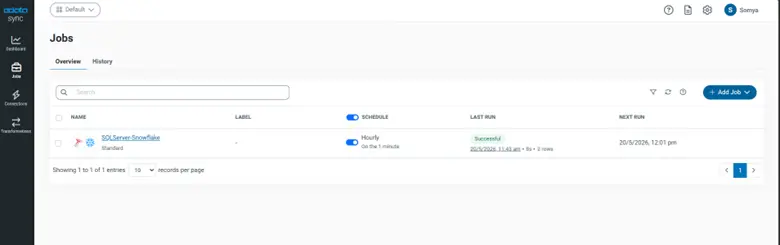
With CData Sync, all five native steps collapse into a single web UI workflow:
Add a SQL Server source connection using the server address, database name, and credentials
Add a destination
Select the tables to replicate and choose a replication mode: full, incremental, or CDC
Set a schedule using cron or interval-based options
Run the job; CData Sync handles driver configuration, schema discovery, and snapshot seeding automatically
For SQL Server instances behind a corporate firewall, the CData Sync on-premises agent enables secure data movement without opening inbound network access.
Performance tuning and security best practices
Place the distribution database on SSDs and store its log file on a separate physical drive to reduce I/O contention. For high-volume transactional replication, increase the Distribution Agent batch size using the -MaxDeliveredTransactions parameter and enable parallel snapshot processing by raising MaxConcurrentSnapshotAgents.
Create SQL Server Agent alerts that fire when transactional replication latency exceeds five seconds or when any agent job fails. Enable SSL on all agent connections and rotate service account credentials according to the organization's security policy.
CData Sync eliminates most of this tuning surface by managing connection pooling, incremental filtering, and job retry logic automatically. Its built-in dashboard monitors row counts, job duration, and error rates in real time, and alert rules notify teams without requiring separate SQL Server Agent configuration.
Advanced scenarios: peer-to-peer, bidirectional, and merge conflicts
Peer-to-peer replication requires SQL Server Enterprise Edition. Create identical publications on each node, enable bidirectional subscriptions, set conflict resolution to originator ID wins, and assign each node a unique originator ID to prevent loops. For merge replication, the three conflict policies are retain publisher changes, retain subscriber changes, or a custom stored-procedure handler applying business rules.
In bidirectional configurations, each site accepts reads and writes, remaining nodes continue operating if one goes offline, and the failed node catches up automatically on reconnect. For multi-region deployments, deploy a regional distributor in each geography and use latency-aware routing to direct reads to the nearest replica.
Each of these topologies demands sustained engineering effort to configure and maintain. CData Sync sidesteps this complexity entirely: adding a new source region, changing a destination, or scaling to additional tables is handled through the web UI without modifying publications, subscriptions, or stored procedures.
Simplified replication with CData Sync
CData Sync is a zero-code configuration data replication platform that replaces native SQL Server agent infrastructure with a configuration-driven interface. There are no publications, distribution databases, or T-SQL stored procedures to manage. Adding a source or destination requires only the server address, database name, and credentials. The drag-and-drop connection builder handles driver configuration and schema discovery automatically, and a simple SQL filter such as WHERE ModifiedDate > @LastSync limits each run to changed rows only.
CData Sync supports cron and interval scheduling, and the built-in dashboard displays job health, row counts, and error details in real time. Alert rules notify teams when a job fails or when row counts fall outside expected ranges. Schema drift is detected and mapped automatically, and an on-premises agent handles SQL Server instances behind corporate firewalls without opening inbound network access.
Key advantages over native replication include predictable per-connection pricing with no row-based or volume-based fees, deployments in minutes rather than days for standard connection patterns, and hundreds of supported destinations, including Snowflake, Redshift, Azure Synapse, and BigQuery.
Real-world impact across industries with CData Sync
Enterprises across financial services, healthcare, and manufacturing have used SQL Server replication and Sync to eliminate data silos, reduce reporting latency, and replace manual reconciliation processes with automated pipelines. Teams that previously spent days configuring native replication topologies have cut deployment time substantially by switching to Sync's zero-code configuration interface and predictable per-connection pricing.
Frequently asked questions
What are the main differences between snapshot, transactional, and merge replication?
Snapshot replication copies data at scheduled intervals, transactional replication continuously streams committed changes, and merge replication allows changes on multiple nodes and resolves conflicts during synchronization.
When should I choose peer-to-peer replication over transactional?
Choose peer-to-peer when each site must read and write data independently and symmetric load balancing is required. Transactional replication is better for one-directional, near-instant updates where subscribers are read-only.
How do I handle schema changes in an active replication setup?
Apply schema changes first on the publisher, then use sp_addarticle or sp_changearticle to propagate updates, and refresh the subscription to avoid replication breakage.
What steps should I take if replication latency spikes?
Check distributor resource utilization, verify network bandwidth, and adjust agent batch sizes or enable parallel processing to reduce latency.
Can CData Sync replace traditional replication agents entirely?
Yes, CData Sync can replicate data without native agents using its connectors and scheduled jobs, delivering comparable latency with zero-code configuration.
Start replicating SQL Server data with CData Sync
CData Sync is a cloud-native replication solution that extends SQL Server replication beyond SQL Server-only subscribers, moving data to hundreds of destinations, including Snowflake, Redshift, Azure Synapse, and BigQuery, with built-in CDC, automated scheduling, governance controls, and connection-based pricing that scales predictably. No agent configuration, no distribution databases, and no custom code required.
Start a free 30-day trial today





