CData CLI (cdatacli) is a single command that turns any of hundreds of data sources into something an AI agent can query, right inside the terminal it already lives in.
You don't wire an agent to a vendor-specific API. You don't open a browser. You don't stand up a server. You give the agent a terminal, point it at a supported source, and state a goal. The agent discovers the schema, writes SQL, validates it, and (if you ask) generates a standalone app. The CLI is the agent's hands; the CData JDBC Drivers underneath are what actually do the work.
This article explains the architecture, then walks through the full setup live: load the skill, pick a driver, set a goal (like "create a Salesforce large opportunity viewer") and watch it happen.
The architecture
It runs where your agent already runs
cdatacli is a Java command-line program. That's the entire integration surface. It works in:
a plain terminal (PowerShell, bash, zsh)
any AI IDE with a terminal, like Claude Code, Cursor, the VS Code/JetBrains agents
a CI job, a container, an SSH session.
If the agent can run a shell command, it can use CData CLI. There is no daemon to keep alive, no socket, no separate process for the model to talk to. The whole experience is in the terminal.
The CLI is thin. The driver does the work.
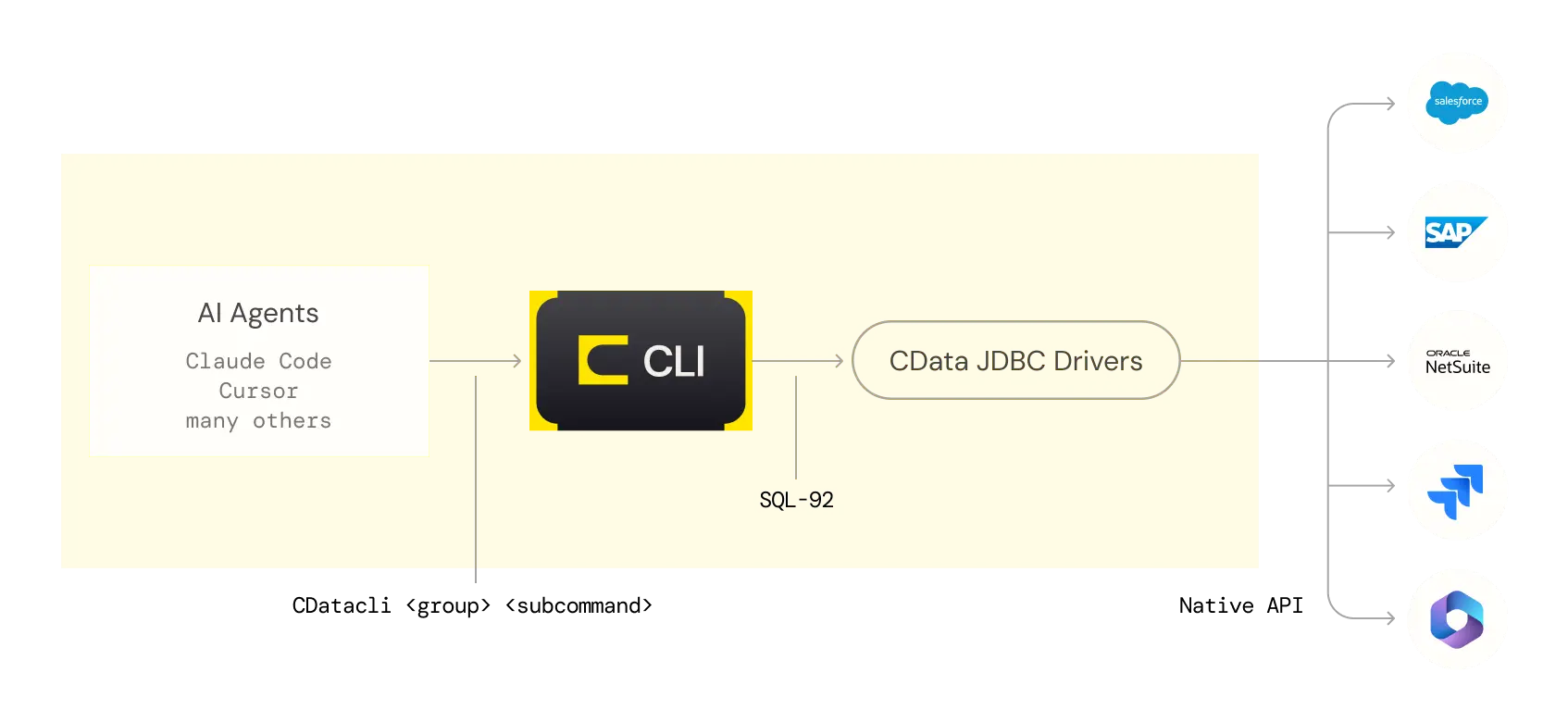
Four properties fall out of this shape, and together they're the reason the CLI is the right agent surface for JDBC drivers:
One SQL dialect across hundreds of data sources. The driver translates SQL-92 into each source's native API. The agent never learns Salesforce's SOQL, NetSuite's SuiteQL, or ServiceNow's REST quirks. It writes SQL it already knows from training.
Metadata is first-class; discover it with metadata commands. Schema discovery isn't a separate protocol or a bulk dump. The CLI exposes dedicated subcommands (metadata tables, metadata columns, metadata procedures) and each takes a filter so the agent pulls only the slice it asked for, never the whole org:
cdatacli metadata tables  --connection sf-sandbox --table "%Opportunity%"
# 22 of 1,058 tables
cdatacli metadata columns --connection sf-sandbox --table Opportunity
# one table's columns
Under the hood these read the driver's system tables (sys_tables, sys_tablecolumns), the same information any SQL engine exposes. But the metadata commands are the front door, and keyword-filtered so an 800- or 1,000-table org never overflows the agent's context.
Compute happens at the data layer, not in the LLM. When the agent writes WHERE Amount >= 100000 ORDER BY Amount DESC, the driver pushes as much of that to the Salesforce API as the API supports, and does whatever's left in the driver process. The model sees the handful of answer rows; never the 20,000 raw records. That's fewer tokens, faster answers, and no LLM arithmetic mistakes.
No MCP and no LLM at runtime. Because the query language is already universal and the driver is an in-process library, there's nothing for an MCP layer to broker. And once the agent has written and validated the SQL, the shipping artifact is clean JDBC code. Build with AI. Ship without it.
The skill teaches the agent the CLI
The agent doesn't guess at flags. A skill, a short markdown file, gives it the command reference, the connection patterns, and the source-specific gotchas (for Salesforce: bracket reserved words, check PickListValues before filtering enums, never list all tables). Loading the skill is step zero.
Setup and use, step by step
Prerequisite: Java 17+. Install the CLI with one line:
Windows:
irm https://downloads.cdata.com/cdatabuilds/builds/free/cdatacli/install-cdatacli-windows.ps1 | iex
macOS:
curl -fsSL https://downloads.cdata.com/cdatabuilds/builds/free/cdatacli/install-cdatacli-macos.sh | bash
Linux:
curl -fsSL https://downloads.cdata.com/cdatabuilds/builds/free/cdatacli/install-cdatacli-linux.sh | bash
After install, cdatacli is on your PATH.
Step 0: Download the Skills
Point the agent at the CData CLI skill so it knows the commands. CData CLI can be used without the Skills, but the Skills give a comprehensive understanding of CData CLI to the LLM.
npx skills add CDataSoftware/cli-skills
Invoke your skill on your terminal. It will verify if there is a CData CLI on your machine and if not, automatically installs CData CLI.
Step 1: Specify a driver and a goal
CData CLI will ask you what data source you want to use and what you want to achieve.
I want to connect to Salesforce. Build a large opportunity viewer.
After this your LLM on the terminal and CData CLI Skills will guide you to achieve your goal and you do not have to type in these CLI commands. In this article, we will illustrate what commands are used typically to achieve this sample goal.
CLI See what's installed:
cdatacli drivers list
{
  "drivers" : [ {
    "path" : "C:\\Users\\JonathanHikita\\cdatacli\\lib\\cdata.jdbc.salesforce.jar",
    "name" : "Salesforce",
    "product" : "CData JDBC Driver For Salesforce 2026",
    "version" : "26.0.9638.0",
    "activated" : true
  } ]
}
If the driver isn't there, the agent pulls one from the CData catalog:
cdatacli drivers search --driver salesforce          # find the artifactId
cdatacli drivers download --artifact-id salesforce-jdbc   # → downloads to ./lib
cdatacli drivers activate Salesforce --name "yourname" --email "[email protected]" --trial
A drivers search returns the catalog entry with its artifactId and download URL:
{
  "drivers" : [ {
    "groupId" : "cdata",
    "artifactId" : "salesforce-jdbc",
    "name" : "CData JDBC Driver For Salesforce 2025",
    "version" : "25.0.9539",
    "url" : "https://maven.cdata.com/p/jdbc/cdata/salesforce-jdbc/25.0.9539/salesforce-jdbc-25.0.9539.jar"
  } ]
}
Step 2: Connect
Then you will create a connection to the source, in this case Salesforce. If you are using CData's embedded OAuth, you can run the connection create command from your AI-terminal. For custom OAuth or other Auth Scheme where you have to provide your own Id, secret or other credentials, it is advised to run the connection create command with another non-AI terminal to avoid credentials to be given to LLMs.
A saved connection stores the auth profile once; every later command refers to it by name. OAuth opens a browser on first connect, then caches tokens so the agent never handles secrets again. For a viewer, connect read-only:
cdatacli connection create --driver "Salesforce" --name "sf-sandbox" \
  --connectionstring "AuthScheme=OAuth;InitiateOAuth=GETANDREFRESH;UseSandbox=true;LoginURL=https://yourorg.sandbox.my.salesforce.com;ReadOnly=true"
cdatacli connection list
{
  "connections" : [ {
    "name" : "sf-sandbox",
    "driver" : "Salesforce",
    "properties" : {
      "AuthScheme" : "OAuth",
      "InitiateOAuth" : "GETANDREFRESH",
      "UseSandbox" : "true",
      "Readonly" : "true"
    }
  } ]
}
Step 3: Watch the agent go
Find the table by keyword with the metadata command. A real Salesforce org has thousands of tables (this sandbox: 1,058), so the agent filters by name instead of listing them all:
cdatacli metadata tables --connection sf-sandbox --table "%Opportunity%"
{
  "tables" : [
    { "TABLE_NAME" : "Opportunity" },
    { "TABLE_NAME" : "OpportunityLineItem" },
    { "TABLE_NAME" : "OpportunityHistory" },
    { "TABLE_NAME" : "OpportunityContactRole" }
  ]
}
→ 22 matches instead of 1,058. Only the slice the agent asked for crosses into context.
Get the exact columns for Opportunity before writing the real query:
cdatacli metadata columns --connection sf-sandbox --table Opportunity
{
  "columns" : [ {
    "TABLE_NAME" : "Opportunity",
    "COLUMN_NAME" : "Id",
    "TYPE_NAME" : "VARCHAR",
    "IS_NULLABLE" : "NO",
    "REMARKS" : "Label Opportunity ID corresponds to this field."
  }, {
    "TABLE_NAME" : "Opportunity",
    "COLUMN_NAME" : "Amount",
    "TYPE_NAME" : "DECIMAL"
  } ]
}
→ confirms Id, Name, Amount, StageName, CloseDate, Probability, IsClosed.
Sample first, with a LIMIT:
cdatacli query sql --connection sf-sandbox \
  --sql "SELECT Id, Name, Amount, StageName, CloseDate FROM Opportunity LIMIT 3"
Build the real query — large = high Amount, biggest first:
cdatacli query sql --connection sf-sandbox \
  --sql "SELECT [Id], [Name], [Amount], [StageName], [CloseDate], [Probability] \
         FROM [Opportunity] WHERE [Amount] >= 100000 ORDER BY [Amount] DESC"
The driver pushes Amount >= 100000 and the ORDER BY down to the Salesforce API. Only the matching rows cross back into the terminal — the agent never pulls the whole Opportunity table.
Step 4: Generate the artifact
With the SQL validated, the agent writes a standalone Java terminal app. It connects through the same Salesforce JDBC Driver and reuses the OAuth tokens the CLI already cached. There's no re-auth, and, critically, no agent and no LLM in the runtime path. The driver does the query; the program just prints it.
// LargeOpportunityViewer.java  (excerpt)
String url = "jdbc:salesforce:" +
    "InitiateOAuth=GETANDREFRESH;AuthScheme=OAuth;UseSandbox=true;" +
    "LoginURL=https://yourorg.sandbox.my.salesforce.com;" +
    "OAuthSettingsLocation=%APPDATA%\\CData\\Salesforce Data Provider\\OAuthSettings_sf-sandbox.txt;" +
    "ReadOnly=true";

String sql = "SELECT [Id],[Name],[Amount],[StageName],[CloseDate],[Probability] " +
             "FROM [Opportunity] WHERE [Amount] >= " + minAmount +
             " ORDER BY [Amount] DESC";

try (Connection c = DriverManager.getConnection(url);
     Statement st = c.createStatement();
     ResultSet rs = st.executeQuery(sql)) {
    while (rs.next()) { /* print Name, Amount, Stage, CloseDate, Probability */ }
}
Build and run it. Pure JDBC, no CLI, no model.
Output sample:
Large Opportunity Viewer
Threshold: $100,000.00  |  all stages
----------------------------------------------------------------------------------------------
Name                                      Amount  Stage                   Close Date     Prob
----------------------------------------------------------------------------------------------
Acme Corp - Mega Renewal             $999,000.00  Proposing               2027-08-22      60%
Globex Corporation - Expansion       $750,000.00  Closed Lost             2025-07-24       0%
Initech - Platform Deal              $500,000.00  Closed Won              2026-03-31     100%
Umbrella Corp - Multi-Year           $450,000.00  Closed Won              2025-07-04     100%
Wonka Industries - Upgrade           $300,000.00  Proposing               2026-09-04      60%
Stark Industries - Sync              $250,000.00  Closed Won              2025-10-09     100%
…
----------------------------------------------------------------------------------------------
16 opportunities  |  total value $5,000,000.00
The viewer reads live data from your org at runtime. The driver does the query, the program just prints it.
Why this shape matters
Each layer removes work from the model:
Layer | What it removes |
One SQL-92 dialect | No per-source API to learn by AI |
Filtered metadata commands | No bulk schema dump that burns token |
Driver-side push-down | No filtering/joining for the LLM to do |
In-process JDBC | No MCP boundary to cross |
Generated app | No LLM in the runtime path at all |
The agent did the design work—discovery, SQL, code generation—in the terminal. The thing you ship is a clean Java program backed by a SQL-92 driver. That's the CData CLI thesis in one line:
Agents write SQL. The driver does the work. The LLM sees only the answer.
Build with AI. Ship without it.





